Password Manager with Item-Level Role-Based Access Control – What Teams Need to Know

A password manager with item-level role-based access control allows teams to define precise permissions for every sensitive credential, ensuring that only the right individuals can view, edit, or share specific items. This blog explains how item-level RBAC works in real-world team environments, why it is essential for reducing unnecessary access, and how solutions like All Pass Hub help teams maintain strong security while keeping access management simple and efficient.

As organizations scale, managing shared credentials across teams becomes more complex and risky. Without granular control, sensitive information is often overexposed, increasing the chances of misuse or accidental leaks. According to Cybersecurity Ventures, global cybercrime costs are expected to reach $10.5 trillion annually by 2025, showing how costly weak access management can be.

With item-level RBAC, teams can assign access based on roles and responsibilities rather than sharing credentials broadly. This not only improves accountability but also limits the impact of potential security incidents. Throughout this blog, you will learn how this approach works, where it fits into your security strategy, and how tools like All Pass Hub make it easier to implement controlled, role-based access without disrupting everyday workflows.

What Is Item-Level Role-Based Access Control?

Role-based access control (RBAC) is a way of managing permissions by assigning them to roles rather than to individual people. Instead of saying “give Sarah access to this login,” you say “give Sarah the Viewer role”, and the role determines what she can do.

Item-level RBAC means those role permissions are applied individually to each credential or folder inside your vault, not to the entire vault or to a single shared workspace. Each item has its own access list.

There are three levels at which password managers commonly apply permissions:

  • Screen-level: Can this person log into the app at all?
  • Workspace-level (vault-wide): Can this person see everything in the vault?
  • Item-level: Can this person access this specific credential, and with what permissions?

Item-level is the most granular of the three. Here is what it looks like in practice:

For Example: A freelance developer is hired to work on one client’s staging environment. With item-level RBAC, you share the staging server login with them directly, they see that one credential, and nothing else in the vault. The client’s billing login, the production database password, and every other item in that folder remain invisible.

For reference: the NIST/ANSI/INCITS RBAC standard defines three formal levels like flat, hierarchical, and constrained RBAC. Item-level RBAC in a password manager maps most closely to flat or hierarchical RBAC: each item’s permissions are assigned per-role, and roles can optionally inherit from one another. You do not need to understand the NIST taxonomy to use item-level RBAC effectively.

Trade-off to be aware of: Item-level RBAC requires someone to configure permissions on each item. For a team of two or three people with full mutual trust, that overhead may not be worth it, a shared folder or workspace-level access may be simpler. The feature pays off as your team grows or when you start working with external contractors and clients.

Why Item-Level RBAC Matters More Than Vault-Wide Permissions

Many password managers offer folder-level sharing: you create a folder, add credentials to it, and share the whole folder with a team member. That works well when everyone in the folder genuinely needs everything in it. The problem is that, in practice, they usually do not.

When access is too broad, the risk is proportionally broader. If a team member’s account is compromised or if an employee leaves without proper offboarding, every credential they had access to is potentially exposed. The same applies to a contractor who was given folder access because it was the easiest way to share one login.

IBM describes the principle of least privilege (PoLP) as giving users “the minimum level of permissions required to complete a task or fulfill a job.” Item-level RBAC is how you enforce that principle at the credential level inside a password manager not just at the app or folder level.

  • Agency scenario

A digital agency manages credentials for six clients in one vault. A subcontractor is brought in to handle social media for one client. With folder-level access only, you either share the entire client folder (including payment gateways, hosting logins, and admin accounts) or you create a new folder just for that contractor. Item-level RBAC lets you share exactly the two social media logins they need, with no restructuring required.

Also Read – The Small Agency Password Playbook: Practical Steps to Strengthen Security in 2026

  • Finance team scenario

An external auditor needs to verify that a billing portal is configured correctly. They need to be able to log in and look around, but they should not be able to change the password or share it with anyone else. Item-level RBAC lets you assign them a Viewer role on that one credential, with edit and share permissions disabled.

Honest caveat: If your team is two or three people who all need access to the same set of credentials and trust each other completely, folder-level permissions are genuinely sufficient. Item-level RBAC adds the most value when you have external contributors, role-specific access needs, or credentials that should only ever be visible to specific individuals.

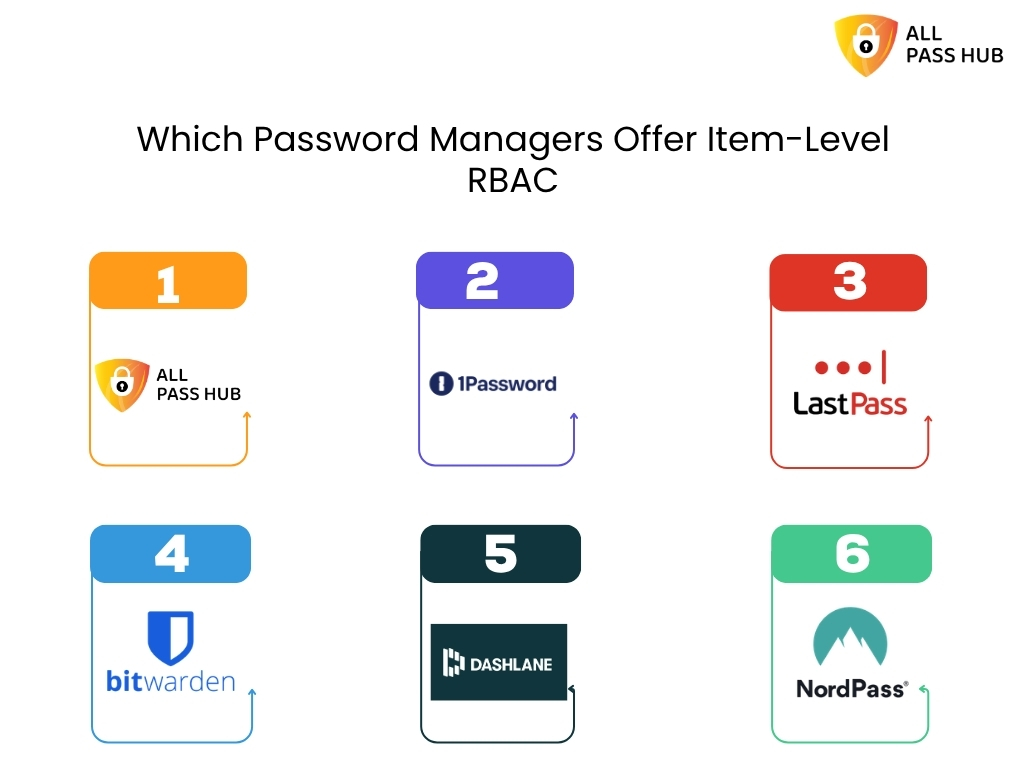
Which Password Managers Offer Item-Level RBAC and What Do They Charge For It?
Which Password Managers Offer Item Level Rbac

This is where the practical difference between tools becomes clear. Most password managers support some form of permission control, but the tier at which item-level granularity becomes available varies significantly.

Password ManagerItem-Level RBACMinimum PlanNotes
All Pass HubYesFreePer-credential permissions on all plans
1PasswordYesBusinessCollection-level sharing; item-level permissions in Teams/Business
LastPassPartialTeams or BusinessFolder-level sharing standard; item-level granularity varies
BitwardenYesTeams / EnterpriseOpen-source; collection permissions model; basic sharing on free
DashlaneYesBusinessSharing rights configurable at item level on paid plans
NordPassPartialBusinessLimited item-level granularity compared to folder-level

The pattern in the table is consistent: for most tools, item-level RBAC is a Business or Enterprise feature that sits behind a paid tier. All Pass Hub makes it available on every plan, including free, which is a meaningful difference for small teams and agencies that need credential-level access control without a per-seat upgrade cost.

One important clarification: tools like 1Password and Bitwarden are well-built products with features that justify their high pricing at scale like audit logs, SSO integration, advanced reporting, and compliance tooling. However, All Pass Hub stands out as an affordable tool offering such useful features.

The comparison here is specific to one dimension: at which pricing tier does item-level RBAC become available? For teams that primarily need that one capability without the enterprise feature set, the tier difference is the relevant factor.

Also Read – What Is the Best Password Manager for Agencies and Small Teams in 2026?

How Item-Level RBAC Works Inside All Pass Hub

Understanding the concept is one thing. Here is what it looks like when you actually configure it.

All Pass Hub supports three core roles at the item level:

  • Viewer – Can see and use the credential. Cannot edit the password, username, or metadata. Cannot share or revoke access.
  • Editor – Can view and update the credential. Cannot manage who else has access to it.
  • Admin – Full control: view, edit, share, and revoke access for other team members.

The workflow for onboarding a contractor looks like this:

  • Step 1 – Add the contractor to your All Pass Hub workspace as a new team member.
  • Step 2 – Open the specific credential they need. Navigate to its sharing or permissions settings.
  • Step 3 – Assign the contractor a role. For most contractor situations, Viewer is appropriate.
  • Step 4 – The contractor logs in and sees only the item(s) you have explicitly shared with them. Everything else in the vault remains invisible to them.
  • Offboarding – When the engagement ends, remove the contractor’s access to that specific item or remove them from the workspace entirely. The rest of the vault is unaffected.

Audit logs: Before publishing, confirm whether All Pass Hub provides an access history or audit log at the item level. For example, whether an admin can see when a specific credential was viewed or used.

Also Read – Password Security for Agencies: Why Ignoring It Could Cost You Everything

Ending Note

Item-level role-based access control is no longer optional for teams that handle shared credentials, it is a foundational part of modern security. By defining access at the individual item level, organizations can ensure that sensitive information is only available to those who truly need it. This approach reduces unnecessary exposure, improves accountability, and creates a clear structure for managing access across teams without adding friction to daily workflows.

As discussed throughout this blog, traditional access models often lead to over-permissioning, where too many users have access to too many credentials. This not only increases internal risks but also makes it harder to track who is responsible for what. Item-level RBAC solves this by aligning access with roles and responsibilities, giving teams better control, clearer visibility, and a more secure way to collaborate.

All Pass Hub provides a practical solution for growing teams by offering item-level access control within an intuitive interface. It helps teams organize credentials, assign permissions with precision, and maintain control as they scale. Instead of relying on manual processes or broad access sharing, teams can use All Pass Hub to create a structured and secure system that supports both productivity and protection.

In the end, adopting a password manager with item-level RBAC is about more than just managing passwords. It is about building a system where access is intentional, risks are minimized, and every team member has exactly what they need to work efficiently without compromising security.

Frequently Asked Questions

  1. What is object-level vs row-level access control?

Object-level access control determines whether a user can access a specific resource at all a file, a credential, a folder. Row-level access control goes deeper, restricting which records within that resource are visible. In a password manager, item-level RBAC is object-level control: each credential is an object, and permissions are set per object rather than per vault or per folder.

2. How does role-based access control work in practice?

An administrator assigns each user a role such as Viewer, Editor, or Admin and each role carries a defined set of permissions. When applied at the item level in a password manager like All Pass Hub, this means a team member with a Viewer role on a specific credential can see it and use it but cannot edit the password or share it with others.

3. What is the principle of least privilege (PoLP)?

The principle of least privilege means giving users the minimum access they need to do their job and nothing more. In a password manager, this means a contractor who needs one client’s FTP login should not have access to every credential in that client’s folder. Item-level RBAC is the technical mechanism that enforces least privilege at the credential level.

4. How is RBAC different from ACLs?

An access control list (ACL) attaches permissions directly to a resource, listing which individual users can access it. RBAC assigns permissions to roles, not users directly users inherit permissions through the role they hold. RBAC scales significantly better than ACLs for teams, because changing one role updates permissions for every user in that role simultaneously, rather than editing each resource’s list individually.

5. What are the three levels of RBAC defined by NIST?

The NIST/ANSI/INCITS RBAC standard (2004) defines three levels: flat RBAC (users assigned to roles, roles assigned to permissions), hierarchical RBAC (roles can inherit permissions from other roles), and constrained RBAC (adds separation of duties to prevent any single user from holding conflicting roles). Most team password managers implement flat or hierarchical RBAC. Constrained RBAC is more common in financial and compliance-heavy enterprise systems.

Last reviewed April 2026. Pricing tiers and feature availability for all products mentioned including All Pass Hub should be verified against each vendor’s current public pricing page before acting on any information in this article.
Zero-Knowledge Password Manager: What It Means and Why It Matters for Teams

Passwords are the first line of defense for every team, yet they are also one of the most common sources of security risk. A zero knowledge password manager is designed to solve this problem by ensuring that only the user can access their stored credentials.

Even the service provider cannot see or read the data. This approach adds a strong layer of privacy and control, which is critical for teams that handle sensitive information every day.

In this blog, you will learn what a zero knowledge password manager really means, how it works behind the scenes, and why it matters for modern teams. It will also explain how this model reduces internal and external risks, supports secure collaboration, and helps organizations stay compliant with data protection standards.

The need for stronger password security is clear. According to its 2024 Password Manager Report, only 36 percent of adults use a password manager, while over half still rely on unsafe methods like memorization or written notes. This shows how important it is to move beyond traditional password storage methods and adopt systems that do not expose sensitive data at any point.

By the end of this blog, you will have a clear understanding of why zero knowledge architecture is becoming essential for teams and how it can strengthen your overall security strategy.

What is zero-knowledge in a password manager?

A zero-knowledge password manager encrypts your vault on your device before any data reaches the provider’s servers. The provider stores only ciphertext never your master password, never your encryption key. Even if the company is breached or subpoenaed, your credentials cannot be read by anyone without your key.

The term gets thrown around in a lot of password manager marketing, which is precisely why it’s worth understanding what it actually requires. Standard encryption protects your data in transit and at rest, but the provider may still hold the decryption keys, which means they could read your data if compelled to, or if their key management is compromised. Zero-knowledge removes the provider from the key equation entirely.

In practice, it works in three steps:

  1. Encryption on your device. Your vault data is encrypted locally, in your browser or app before it goes anywhere.
  2. Only ciphertext leaves your device. The encrypted blob is what travels to the server. Unreadable without your key.
  3. Decryption on your device. When you open your vault, the ciphertext comes back and is decrypted locally. The server never sees plaintext.

Your master password never leaves your device. The server stores a cryptographic proof that you know the correct password, enough to verify your identity, but not the password itself and not the derived encryption key.

Zero-knowledge is a spectrum, not a binary certification. A provider can implement client-side encryption for vault contents but still retain unencrypted metadata, URL entries, timestamps, vault item counts.

A USENIX Security ’26 paper analysing cloud-based password managers found design anti-patterns in some products’ ZK claims. When evaluating the right password manager, ask specifically what is and is not covered by their zero-knowledge model.

How All Pass Hub implements zero-knowledge encryption

Most password managers that claim zero-knowledge describe the concept without disclosing the technical specifics. Here is All Pass Hub’s implementation stack in full, the kind of detail that lets you verify the claim rather than take it on faith.

LayerImplementationWhat it means
Vault encryptionAES-128Your vault data is encrypted using AES-128 (Advanced Encryption Standard with a 128-bit key). This cipher has no known practical attack at current computing capability.
Key derivationPBKDF2-SHA256, 600,000 iterationsPBKDF2 (Password-Based Key Derivation Function 2) converts your master password into an encryption key by running it through SHA-256 hashing 600,000 times. This makes brute-force guessing computationally expensive. NIST recommends a minimum of 600,000 iterations as of 2023.
Shared vault key exchangeRSA-based key exchangeWhen you share access to a vault with a team member, RSA (an asymmetric encryption algorithm) is used to securely wrap the vault key for each recipient. The server facilitates the exchange without ever receiving the plaintext vault key.
Encryption locationClient-side (browser / app)All encryption and decryption happens on your device. The All Pass Hub server receives and stores ciphertext only.

What this means in a breach scenario: if All Pass Hub’s servers were compromised tomorrow, an attacker would retrieve an encrypted blob that is computationally unreadable without each user’s master password and derived key. There is no server-side key to steal because one does not exist.

A note on AES-128 vs AES-256. AES-128 and AES-256 differ in key size (128-bit vs 256-bit). Both are considered secure against current and near-future attacks which means no practical attack exists against either.

However, some compliance frameworks (FedRAMP, certain ISO 27001 auditors) specifically require AES-256. If your organisation operates under one of these frameworks, verify this detail with All Pass Hub before committing.

Is All Pass Hub zero-knowledge?

Yes. All Pass Hub is designed around a zero-knowledge architecture, which means your sensitive data is encrypted before it ever leaves your device. Only you and the people you explicitly grant access to can decrypt that data. The platform does not have access to your plaintext passwords, encryption keys, or vault contents.

All Pass Hub uses strong encryption standards and a secure key management approach to ensure that credentials remain protected at all times. Its use of RSA-based key exchange enables secure sharing between users while preserving the zero-knowledge model. This is particularly important in team environments where credentials need to be accessed by multiple people without exposing the underlying data.

Unlike many password managers that were originally built for individual use, All Pass Hub is structured specifically for teams. This allows it to handle shared access, role-based permissions, and user lifecycle management in a way that aligns with how organisations actually operate.

For comparison, Bitwarden also follows a zero-knowledge model and is widely respected for its security practices, including client-side encryption and open-source transparency. Bitwarden encrypts vault data client-side using AES-256 and derives encryption keys from your master password using PBKDF2.

Bitwarden’s servers never receive your plaintext passwords or your encryption key. Bitwarden has also published a detailed white paper defining the scope of their zero-knowledge model, including a pointed acknowledgement that some unnamed competitors retain unencrypted URL data, giving those providers detailed records of which sites users visit. Bitwarden encrypts URLs within the vault.

Bitwarden is also open-source. That means their zero-knowledge implementation can be and has been independently audited, not just claimed. For a security-sensitive purchase, that is a genuine differentiator worth acknowledging. It is a strong choice for individuals and for teams that are comfortable adapting an individual-first vault structure to collaborative use.

The key difference lies in design focus. All Pass Hub approaches zero-knowledge with team workflows as a core requirement, not an extension. This makes it a practical option for organisations that need secure credential sharing, structured access control, and efficient onboarding and offboarding without compromising on security.

Also Read – Bitwarden vs All Pass Hub — Which Password Manager Is Right for Your Team?

Which password managers are truly zero-knowledge?

Which password managers are truly zero-knowledge?

Before the list: “truly zero-knowledge” is not a certified standard. It is a design claim, one that is only as reliable as a vendor’s published documentation and, ideally, independent audit. The USENIX Security ’26 paper on cloud-based password managers found design vulnerabilities in some products that marketed themselves as zero-knowledge. That paper is worth reading if you are making a security-sensitive purchasing decision.

With that caveat stated, the following managers have documented client-side encryption and no server-side key access, based on available published evidence.

Evaluation criteria used:

(1) client-side encryption confirmed,

(2) master password never transmitted to the server,

(3) key derivation function with sufficient iteration count,

(4) no unencrypted metadata retention.

  • All Pass Hub – AES-128 client-side encryption, PBKDF2-SHA256 with 600,000 iterations, RSA-based key exchange for shared team vaults. Designed natively for multi-user credential sharing while preserving zero-knowledge throughout.
  • Bitwarden – AES-256 client-side encryption, PBKDF2 key derivation, open-source and independently audited. Encrypts vault URLs. Particularly strong for individual users and self-hosted environments.
  • 1Password – Zero-knowledge encryption with account passwords never sent over the network. Uses a Secret Key model (a locally-stored key combined with your master password) for additional protection.
  • NordPass – All encryption and decryption occurs on the user’s device before backup and sync. Master password not stored by NordPass.

When evaluating any tool on this list, ask one additional question: does the provider encrypt vault metadata, specifically, the URLs of sites for which you store credentials? Some providers retain these unencrypted. For most teams this is a low-risk detail; for teams handling sensitive client credentials, it matters.

Also Read – The Small Agency Password Playbook: Practical Steps to Strengthen Security in 2026

Does zero-knowledge mean the company can’t access my passwords?

Yes, in a properly implemented zero-knowledge model, the answer to this question is an unambiguous yes. The company cannot read your vault contents. It does not matter if they want to, if they are audited, or if a government issues a lawful request for your data. Without your encryption key, the data is ciphertext. They cannot produce what they do not hold.

ZK protects against

  • Server-side data breaches
  • Insider threats and rogue employees
  • Subpoenas for vault contents
  • Provider infrastructure compromise

ZK does not protect against

  • A compromised device or browser extension
  • A weak master password (brute-forceable)
  • Unencrypted metadata (URLs, timestamps) if retained
  • User error — phishing, for example

There is one important implication that catches teams off guard: account recovery. Because the provider does not store your master password, they cannot reset your vault if you forget it. Most zero-knowledge managers handle this by generating an emergency access kit or recovery code at account creation, a one-time credential you store offline. If you lose both your master password and your recovery code, the vault contents are unrecoverable by design.

For All Pass Hub specifically, users should generate and store their recovery code at account setup. IT administrators managing a team account should treat this code with the same care as any other critical offline credential, ideally stored in a physical safe or an offline secrets manager.

Zero-knowledge is not a guarantee of perfect security. It eliminates one class of risk provider access to your vault but your data is only as secure as the device it lives on, the master password protecting it, and the practices of the people who have access to it.

Also Read – Password Security for Agencies: Why Ignoring It Could Cost You Everything

Why zero-knowledge architecture matters specifically for teams

Most zero-knowledge explainers are written for a single user with a personal vault. The team context introduces three scenarios that the single-user model does not have to solve and where the architecture matters far more than the marketing.

1. Sharing without exposing

When you share a vault credential with a colleague, the encryption model faces a challenge: the server needs to facilitate the exchange without ever receiving a plaintext key. All Pass Hub’s RSA-based key exchange solves this. Each team member holds their own keypair; when a vault item is shared, the item key is wrapped (encrypted) using the recipient’s public key. The server passes the encrypted package but never sees its contents. Zero-knowledge is preserved through the share event, not just within individual vaults.

2. Offboarding that actually works

When a team member leaves, revoking their vault access is only meaningful if the access was genuine and localised. In a zero-knowledge model, the departing employee never held server-side keys, only their own local keypair and the vault items explicitly shared with them. Revoking their access removes their ability to decrypt those items going forward. There is no risk that a compromised server credential gives them continued read access, because the server never held decryptable data in the first place.

3. Admin logs without admin access

A common misconception is that audit logging is incompatible with zero-knowledge that if an admin can see who accessed what, the admin must be able to see the contents. This is not the case. Audit logs record access events (which user accessed which vault item, and when) without recording what was in those items. The metadata of an event is not the same as the plaintext of the vault entry. Admins get the visibility they need; the content remains encrypted.

4. Client credentials at agencies

For agencies specifically, zero-knowledge carries a client trust implication that goes beyond internal security. When client credentials are stored in a shared team vault, a properly implemented ZK model means those credentials are private even from the agency’s own infrastructure team. If your cloud hosting provider, your DevOps contractor, or a senior employee were to access the server, they would find ciphertext. The ZK guarantee is the agency’s assurance to clients that their credentials are not simply trusted to good behaviour, they are protected by design. That is a secure password vault for teams in the fullest sense of the phrase.

Understanding how All Pass Hub handles team sharing at the architecture level changes the conversation from “which password manager has the best interface” to “which password manager’s security model actually holds up when your team is the threat model.” If you are ready to evaluate this for your team, get started with All Pass Hub to see the implementation in practice.

Security Is Stronger When It’s Built for Teams

Zero-knowledge is not just a technical feature. It is the foundation of trust in any modern password manager. It ensures that sensitive data stays private, even from the provider itself, and reduces the risk surface in the event of a breach. As more teams move toward shared digital environments, understanding how zero-knowledge works in practice becomes essential.

Solutions like Bitwarden demonstrate how strong encryption and transparent security practices can protect individual users and smaller setups effectively. However, as soon as password management becomes a team responsibility, the requirements shift. Secure sharing, access control, and user lifecycle management become just as important as encryption itself.

This is where All Pass Hub stands out. It applies the zero-knowledge principle in a way that aligns with real-world team workflows. By combining strong encryption with a team-first architecture, it enables organisations to share credentials securely, manage access with clarity, and scale without adding operational complexity.

If your use case involves multiple users, ongoing onboarding and offboarding, or frequent credential sharing, choosing a solution built specifically for teams can make a meaningful difference. All Pass Hub offers that balance of security and usability, making it a practical option for teams that want to stay protected without slowing down their operations.

Frequently asked questions

What is zero-knowledge in a password manager?

    A zero-knowledge password manager encrypts your vault on your own device before any data is sent to the provider’s servers. The provider stores only encrypted ciphertext and never your master password or decryption key. Even the company’s own engineers cannot read your stored credentials. All Pass Hub uses this model: encryption and decryption happen client-side, and the server receives only data it cannot interpret.

    Which password managers are truly zero-knowledge?

      Password managers with documented client-side encryption and no server-side key access include All Pass Hub, Bitwarden, 1Password, and NordPass. Each encrypts vault data before it leaves your device and does not store your master password. All Pass Hub additionally uses RSA-based key exchange to preserve zero-knowledge during team credential sharing. Buyers should confirm whether their chosen tool also encrypts vault URLs and metadata, as some providers retain these unencrypted.

      What encryption does All Pass Hub use?

        All Pass Hub uses AES-128 encryption for vault data, PBKDF2-SHA256 with 600,000 iterations for key derivation from your master password, and RSA-based key exchange for shared team vaults. All encryption and decryption occur client-side; the All Pass Hub server receives only ciphertext that cannot be decrypted without your master password.

        Does zero-knowledge mean the company can’t access my passwords?

          Yes, in a properly implemented zero-knowledge model, the company cannot access your vault contents even if legally compelled to produce them, because they do not hold your encryption key. However, zero-knowledge does not protect against a compromised device, a weak master password, or metadata the provider may retain (such as login timestamps or unencrypted URLs). Always verify what a provider’s zero-knowledge claim specifically covers.

          Can a zero-knowledge password manager recover my account if I forget my master password?

            Because a zero-knowledge password manager does not store your master password, the company cannot reset your vault on your behalf. Most implementations offer an emergency access kit or recovery code generated at account creation, this must be stored securely offline. All Pass Hub users should generate and store their recovery code when setting up their account.

            How All Pass Hub’s Password Manager Audit Trail Protects Agencies from Client Disputes

            You’ve just received a message from a client. They’re upset — their social media account password was changed without their knowledge, and they want to know who did it and why. You turn to your team. Someone says, “I think it was updated last week, but I’m not sure who did it.”

            That answer isn’t good enough, and you know it.

            This is the silent vulnerability most agencies carry: no clear record of who accessed which client credential, when, and why. When a dispute surfaces, there’s nothing concrete to show.

            An audit trail for a password manager solves exactly this. It’s a complete, chronological log of every action taken on stored credentials, who accessed them, who changed them, and precisely when each event occurred.

            All Pass Hub’s audit trail gives agencies a transparent, tamper-proof record of all credential activity across every client account. This guide walks through what it records, how agencies use it day-to-day, how it resolves disputes step by step, and why it’s become a quiet but powerful competitive advantage.

            1. The Real Problem Agencies Face When Managing Multiple Client Accounts

            Most agencies are quietly juggling hundreds of logins across their client base. Social media accounts, CMS platforms, ad dashboards, hosting panels, email tools, analytics accounts. The list grows with every new client and every new platform.

            The problem isn’t that teams are careless. The problem is structural. When multiple people share access to the same credentials, individual actions become invisible.

            Who viewed the login? Who copied it? Who made a change and when?

            Without a dedicated tracking system, the honest answer is: nobody knows for certain.

            This lack of visibility becomes even more risky when you consider that, according to IBM’s Cost of a Data Breach Report, compromised credentials are one of the most common causes of security incidents and can significantly increase the time it takes to identify and contain a breach.

            Agencies fall back on memory and informal communication. “I think Sarah accessed it last Thursday.” That’s not a defensible answer when a client is asking hard questions.

            How Disputes Typically Surface

            TriggerWhat the Client NoticesWhat the Agency Can’t Explain
            Unauthorised postContent published they didn’t approveWho had access at that time
            Changed settingAccount configuration alteredWhich team member made the edit
            Locked accountLogin no longer worksWhether the agency changed the password
            Missing file or assetSomething deleted or movedWho last accessed the credentials

            Disputes happen more often than agencies expect. And in every case, the agency faces the same problem: without proof, it cannot explain or defend itself, even if it did everything right.

            The core issue is accountability. Shared team access without individual tracking creates a blind spot, and that blind spot grows every time the team expands or a new client is onboarded.

            2. What an Audit Trail Actually Is in a Password Manager

            An audit trail in a password manager is a continuous, unalterable log that records every interaction with stored credentials. Every action is documented the moment it happens, not summarised, not approximated. Documented.

            Think of it like a bank statement. Your bank doesn’t just show your current balance, it shows every deposit, withdrawal, and transfer, with an exact timestamp. You can look back at any point in history and know exactly what happened. An audit trail does the same thing for credential activity.

            What a Proper Audit Trail Records

            Data PointWhat It Captures
            WhoThe specific team member who performed the action
            WhatWhether they viewed, copied, edited, shared, or deleted the credential
            WhenThe exact date and time of the action
            Which credentialThe specific login that was accessed or changed
            Which clientThe vault or account the credential belongs to

            Audit Trail vs. What Most Agencies Have

            ApproachWhat It CapturesUseful in a Dispute?
            No loggingNothing✗ No
            Basic login logsWho logged into the system✗ Rarely
            Audit trail (All Pass Hub)Every credential-level action, by individual user✓ Yes

            The word unalterable is important. A proper audit trail cannot be edited or deleted retroactively — not even by admins. That’s what gives it credibility. If it could be changed, it wouldn’t be evidence; it would just be another document that someone might have modified.

            3. What All Pass Hub’s Audit Trail Records

            Credential access monitoring is only useful if it captures the right data. Here’s exactly what All Pass Hub logs, and why each data point matters in practice.

            A. User Identity

            Every action is tied to a specific team member, not just the account login. This makes individual accountability possible even in a shared workspace. When a dispute arises, you’re not looking at a vague log entry that says “someone accessed this”, you know exactly who.

            B. Action Type

            The log distinguishes between meaningfully different events. Password usage tracking captures each one separately:

            ActionWhy It Matters
            ViewedConfirms someone looked at the credential without necessarily using it
            CopiedIndicates the credential was taken out of the vault, possibly used externally
            EditedShows a change was made which is the most common source of disputes
            SharedRecords when access was extended to another person
            DeletedDocuments permanent removal of a credential

            C. Timestamp

            Every entry includes the exact date and time of the action. In a dispute where a client says “this happened on Tuesday afternoon,” the timestamp either confirms or rules out agency involvement. There’s no ambiguity.

            D. Password Change History Tracking

            When a credential is updated, the system logs who changed it and when, that too without storing the old password in plain text (security is preserved). But the change event itself is fully documented. Password change history tracking means you always know when credentials were rotated, who did it, and in what context.

            E. Client or Vault Association

            Every log entry is linked to a specific client vault. When reviewing a dispute, you can filter the entire log to show only that client’s activity eliminating the need of shifting through unrelated entries.

            F. Device or IP Address

            Depending on configuration, All Pass Hub can also capture the device or network from which access occurred that are extremely useful when investigating whether access happened from an expected location.

            4. How Agencies Use the Audit Trail in Daily Operations

            The audit trail isn’t just a break-glass-in-emergency feature. For well-run agencies, it becomes part of everyday workflow acting as a quiet layer of discipline that makes everything run more smoothly.

            A. Role-Based Access Enforcement

            Because the audit trail tracks individual users, agencies can set clear access permissions by role — and then verify those permissions are being respected.

            Example: If only the social media manager should access a particular client login, the log will immediately show if anyone else did. Credential access monitoring doesn’t just record what happened, it holds team members accountable to the rules you’ve set.

            B. Onboarding and Offboarding Checklist

            ✅ New Team Member Onboarding

            • Assign role-based vault access in All Pass Hub
            • Confirm the audit trail is logging their activity from day one
            • Review first-week access log to confirm permissions are working as intended

            ✅ Employee Offboarding

            • Revoke vault access immediately upon departure
            • Pull the audit trail for that team member’s full access history
            • Review for any unusual access in the weeks before departure
            • Document the review and retain for client records

            C. Regular Access Reviews

            Agencies can run periodic checks like weekly or monthly to verify that only the right people are touching the right credentials. This is preventive, not reactive.

            Suggested review cadence:

            FrequencyWhat to Check
            WeeklyAny access outside normal working hours
            MonthlyFull access review per client vault
            At project closeComplete credential activity log for the engagement
            After personnel changesAccess history for the departing or joining team member

            D. Handover Documentation

            When a project wraps up or a client relationship ends, the audit trail provides a complete record of all credential activity during the engagement. Both sides know what was accessed, what was changed, and when. Handovers become clean, clear, and dispute-free.

            5. How the Audit Trail Resolves Client Disputes

            This is where the audit trail earns its place. Let’s walk through exactly what resolution looks like.

            The Scenario

            A client messages your agency. Their social media account password was changed without their knowledge or so they believe and they want to know who did it and why. They’re not angry yet, but the tone is pointed. They want answers.

            Without an audit trail, you’re stuck. You can ask your team, piece together memories, and come back with something vague. With All Pass Hub’s audit trail, you have the answer in minutes.

            The Resolution Process

            1. Identify the client vault

                     │

                     ▼

            2. Filter the audit log by credential + time range

                     │

                     ▼

            3. Read the log — who accessed it, what they did, when

                     │

                     ▼

            4. Generate and export the report

                     │

                     ▼

            5. Share with the client

            Step 1 – Identify the client vault Navigate to the relevant client’s vault in All Pass Hub. All credentials and their associated activity are housed here.

            Step 2 – Filter the audit log Filter the audit trail by the specific credential in question and set the time range to the period the client is asking about.

            Step 3 – Read the log The log shows exactly who accessed or modified the credential, with timestamps. If a change was made by a team member, the record shows who. If no change was made at all, the record confirms that clearly.

            Step 4 – Generate the report Pull a readable report of the audit log for that credential and time frame. All Pass Hub formats this as a clean, shareable document, no technical jargon, no raw data.

            Step 5 – Share with the client Send the report to the client. The dispute is resolved with evidence, not with argument.

            Scenario A: The Agency Is Cleared

            The audit log shows no changes to the credential during the period in question. No team member accessed it. The agency shares this record with the client, clearly, professionally, without defensiveness.

            The client now knows the change didn’t come from the agency’s side, and the investigation can move in a more productive direction. The agency’s reputation is protected.

            Scenario B: The Agency Takes Accountability

            The audit log reveals that a team member did access and modify the credential, possibly without proper authorisation.

            This outcome, while uncomfortable, is actually better than a dispute that never gets resolved. The agency can acknowledge what happened, explain the context, and demonstrate that the access control issue has been corrected.

            Clients respect accountability. What damages relationships isn’t mistakes, it’s the inability to own them. The audit trail makes ownership possible.

            Dispute Outcomes at a Glance

            SituationWithout Audit TrailWith All Pass Hub Audit Trail
            Agency made no changesCan’t prove itLog confirms no access — client satisfied
            Team member made an errorBlame is unresolvedSpecific event identified, accountability taken
            Client made the changeCan’t demonstrate thisLog shows no agency activity — inquiry redirected
            Access occurred outside hoursUnknownFlagged in the log with timestamp and device

            6. How the Audit Trail Supports Compliance for Agencies

            Beyond dispute resolution, there’s a broader context that many agencies don’t consider until they pitch to their first enterprise client: compliance.

            Many industries that agencies serve, healthcare, finance, legal, e-commerce, operate under data protection regulations that require documented access control. An audit trail isn’t just good practice in these contexts; it’s often a formal requirement.

            Compliance Framework Alignment

            FrameworkRequirement Relevant to Audit TrailsHow All Pass Hub Helps
            GDPRDemonstrate who had access to personal data and whenFull per-user, per-credential access log
            HIPAAAudit controls for access to protected health informationTamper-proof activity log with timestamps
            SOC 2Logical access and monitoring controlsCredential-level access monitoring with exportable reports

            For agencies pitching to enterprise clients or regulated businesses, showing that your password management includes audit trail capability is a competitive differentiator. Most agencies can’t answer the question “do you have a documented record of credential access?” If you can and you can show it you move into a different tier of consideration.

            Internal compliance matters too. Agency owners can show investors, auditors, or partners that the business follows controlled access practices not just in policy documents, but in actual, verifiable records.

            7. How All Pass Hub Makes the Audit Trail Easy to Use

            A powerful audit trail that’s buried in an admin panel no one can navigate is almost as useless as not having one. All Pass Hub was designed so that the audit trail is accessible, readable, and actionable for any team member, not just the technical ones.

            Feature Overview

            FeatureWhat It DoesWhy It Matters
            In-vault accessAudit trail lives inside the client vaultNo separate admin panel or IT support needed
            Smart filtersFilter by user, action, credential, or date rangeFind specific events in seconds
            Plain language logsWritten in readable English, not event codesAny team member can understand it
            Exportable reportsGenerate shareable reports in a clean formatReady to send to clients without reformatting
            Activity alertsNotifications for unusual access (e.g. after hours)Proactive monitoring, not just reactive review

            How to Access the Audit Trail (Quick Sequence)

            Open All Pass Hub

                    │

                    ▼

            Navigate to the relevant client vault

                    │

                    ▼

            Select the credential in question

                    │

                    ▼

            Open the audit log tab

                    │

                    ▼

            Apply filters (user / action type / date range)

                    │

                    ▼

            Review log entries

                    │

                    ▼

            Export report if needed

            The log is written in readable language not raw event codes or cryptographic identifiers. An account manager, a project lead, or the agency owner can open the log and understand exactly what it says without needing a technical background.

            8. Building Client Trust Through Transparency

            Everything covered so far has been operational. But there’s a bigger picture worth stepping back to see.

            Trust between an agency and its clients is built on transparency. When an agency can tell a client, “Here is exactly what happened with your credentials, and here is the proof,” the relationship becomes more durable. It’s not a claim. It’s documentation.

            Reactive vs. Proactive Use of the Audit Trail

            ApproachWhen It’s UsedEffect on Client Relationship
            ReactiveOnly when a dispute arisesResolves problems, restores trust after damage
            ProactiveRegular access reports shared with clientsSignals accountability before problems arise

            Proactive transparency is more powerful. Agencies that share access reports with clients regularly not just when something goes wrong signal a level of confidence and accountability that most clients have never experienced from an agency before. It changes the nature of the relationship.

            Clients who know their credentials are managed with a fully audited system are more likely to expand the scope of work they give you. They’re trusting you with their accounts precisely because you can demonstrate that trust is warranted.

            Compare this to the alternative. Clients with no visibility into how their logins are handled tend to feel anxious. They raise more disputes not because more things go wrong, but because they can’t tell what’s happening. Over time, that anxiety erodes confidence and drives them toward agencies that offer something better.

            The audit trail isn’t just a defensive tool. It’s a relationship tool. And in an industry where long-term client relationships are the difference between a growing agency and a struggling one, that distinction matters.

            Conclusion

            The agencies that thrive long term are the ones clients trust completely. That trust doesn’t come from good intentions, it comes from demonstrated accountability.

            All Pass Hub’s audit trail gives agencies the infrastructure to be accountable: a tamper-proof record of who accessed which credential, what they did with it, and when. It resolves disputes with evidence instead of argument. It supports compliance with GDPR, HIPAA, and SOC 2. It protects agencies when clients raise concerns and it empowers agencies to take responsibility when something goes wrong.

            Above all, it transforms credential management from something that happens invisibly in the background into something you can stand behind, show to clients, and use to build stronger relationships over time.

            If you’re managing client credentials without a clear record of every access and change, that gap is worth closing. All Pass Hub’s audit trail is a natural place to start, explore it and see how it fits into how your agency works.

            Stop Wasting Time On Passwords: How All Pass Hub Streamlines Team Access

            Did you know that employees spend an average of 11 hours every year simply resetting forgotten passwords? For an organization of 15,000 people, that adds up to nearly $5.2 million in lost productivity annually. [Source: Bloomberg]

            Scattered logins in spreadsheets, credentials shared over chat, and weak passwords reused across platforms are not just annoyances; they are gateways to compliance failures, insider threats, and costly security breaches that businesses cannot afford to have. This is why team password security has become essential. 

            Remote and hybrid teams need more than sticky notes or browser autofill. They require a team password manager that is both simple to use and built on resilient safeguards. That is where solutions like All Pass Hub come in. 

            This guide will uncover the hidden costs of ineffective password habits, the advantages of centralized vaults, and how enterprise password management helps teams reclaim time while building resilience. 

            By focusing on ways to stop password waste and streamline team passwords, teams gain an organized, encrypted foundation accessible only to those who genuinely need it.

            So let’s explore how better password management turns wasted minutes into business momentum.

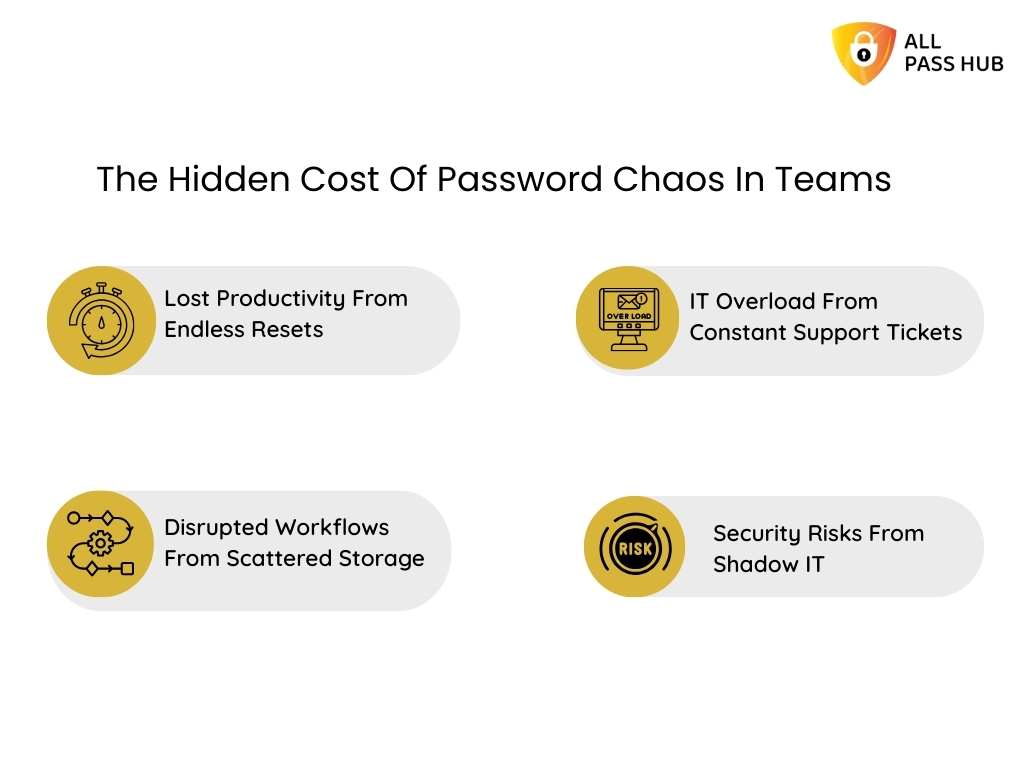
            The Hidden Cost Of Password Chaos In Teams

            The Hidden Cost Of Password Chaos In Teams

            The numbers around wasted time and disorganized logins are not just notional statistics. They translate into daily frustrations for employees and growing risks for businesses. Every forgotten password or misplaced login creates a ripple effect across the organization. 

            Let’s explore how this mess happens in practice.

            Lost Productivity From Endless Resets

            Employees often spend precious minutes trying multiple variations of a password or waiting for IT to reset it. Multiply this by dozens of accounts per person, and the time wasted becomes staggering. 

            Ineffective workplace password management drains momentum from critical tasks.

            Disrupted Workflows From Scattered Storage

            When a key credential is buried in an old email or locked in one employee’s notebook, projects are hindered. Teams chasing down missing logins are not collaborating; they are firefighting. It is one of the most common password management mistakes businesses make.

            IT Overload From Constant Support Tickets

            Help desks often spend up to 40 percent of their time resolving credential-related issues. Without centralized password management, IT professionals become gatekeepers of forgotten logins rather than focusing on strategic security initiatives.

            Security Risks From Shadow IT And Weak Sharing Habits

            In the absence of proper controls, employees adopt their own shortcuts, such as sharing passwords through chat apps or using unauthorized tools. This shadow IT culture creates blind spots in password security for businesses. It exposes organizations to compliance failures and breaches.

            Essential Insight: Poor password habits are more than an annoyance; they are a hidden tax on time, security, and trust. The longer teams depend on ad hoc methods, the more costly the chaos becomes. 

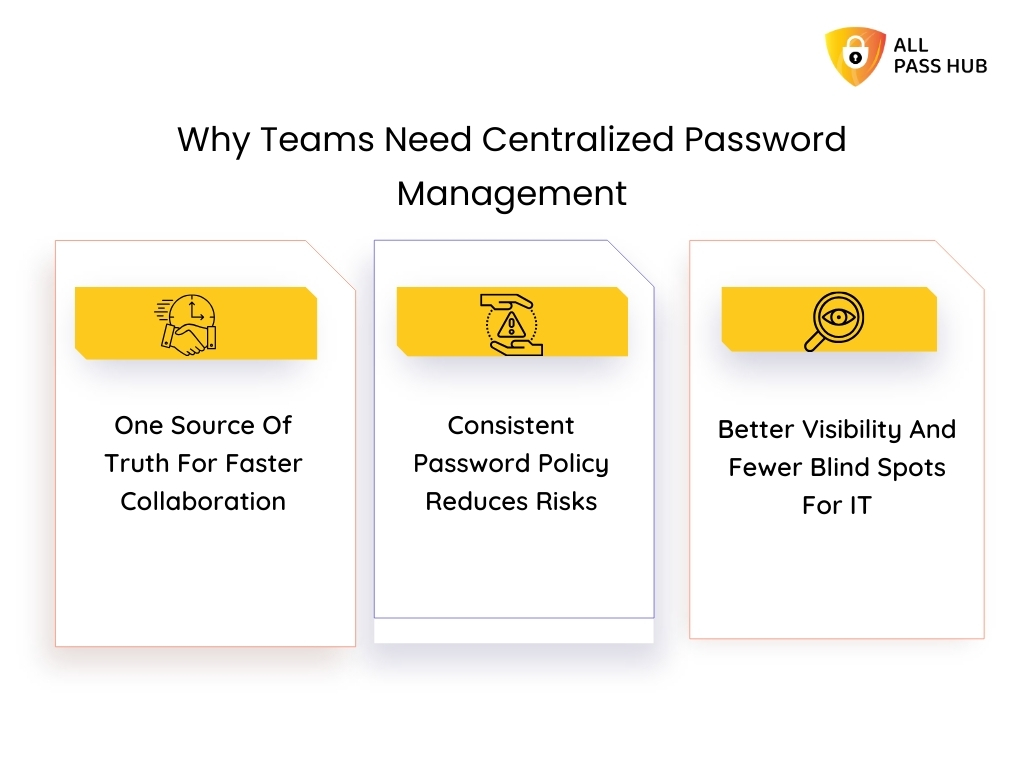
            Why Teams Need Centralized Password Management

            Why Teams Need Centralized Password Management

            A scattered approach to managing credentials depletes productivity and creates invisible risks. Teams often manage multiple platforms without a clear system, which means resets, delays, and shadow IT quickly become the norm. 

            Organizations need centralized password management to change this pattern. It should simplify workflows, enforce policies, and provide oversight. Hence, we will break down how a shared vault transforms everyday efficiency.

            One Source Of Truth For Faster Collaboration

            Instead of chasing down links or waiting for a colleague to share login details, teams can pull credentials from a shared, encrypted vault. It eliminates confusion and accelerates daily workflows, allowing employees to focus on meaningful tasks rather than lost logins.

            Consistent Password Policy Reduces Risks

            With a centralized hub, IT can enforce standards like resilient passwords, regular updates, and multi-factor authentication. It ensures everyone follows the same team credential management practices, minimizing weak spots and compliance gaps.

            Better Visibility And Fewer Blind Spots For IT

            A centralized password management system equips IT leaders with the oversight they need for supervision. Audit trails, access reports, and activity logs make it straightforward to know who accessed what, when, and why. 

            This visibility helps prevent insider threats and ensures accountability.

            The Crux: Centralized password management replaces chaos with clarity. A single vault enforces policies, boosts teamwork, and empowers IT with complete visibility.

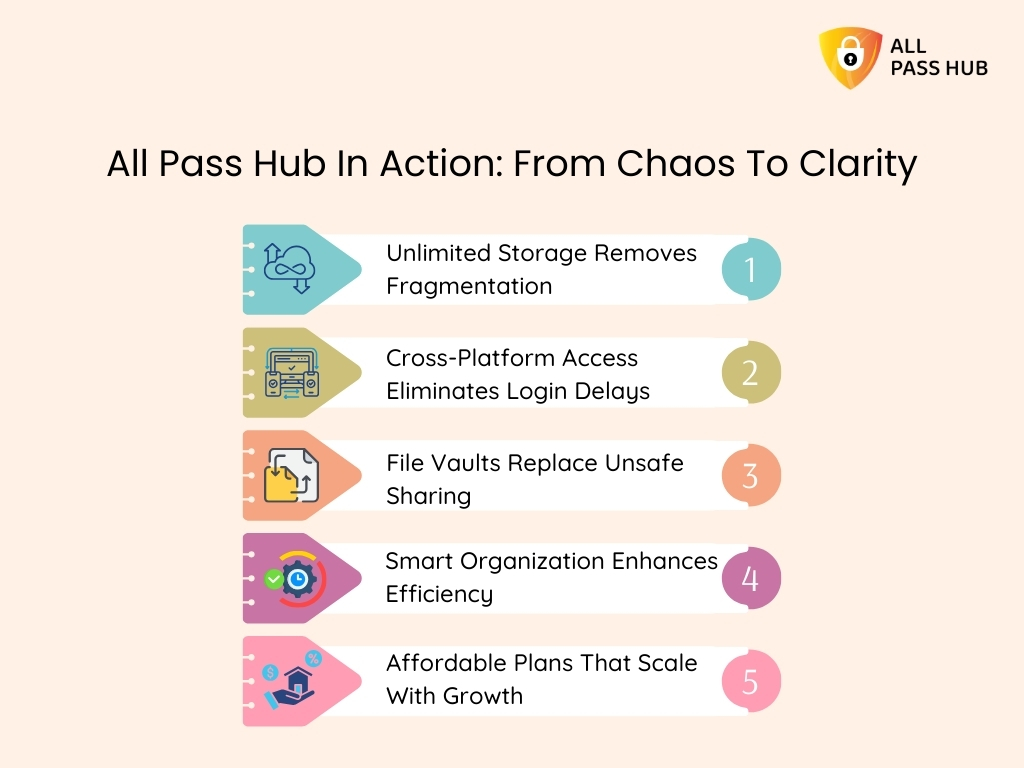
            All Pass Hub In Action: From Chaos To Clarity

            All Pass Hub In Action: From Chaos To Clarity


            Depleted productivity and increasing risks become the norm when teams handle multiple platforms without a central system. Lost logins delay projects, unsafe sharing creates exposure, and cluttered storage disrupts focus. It is where All Pass Hub emerges as a premier option to turn everyday frustrations into smooth workflows by mapping features directly to team pain points. 

            Let’s explore how it streamlines chaos.

            Unlimited Storage Removes Fragmentation

            Instead of juggling spreadsheets or random notes, All Pass Hub offers a single password vault for teams. From logins and payment cards to licenses and sensitive files, every credential is stored in a single, secure place. The cloud sync ensures real-time updates across devices.

            Cross-Platform Access Eliminates Login Delays

            Remote work demands flexibility. With apps for desktop and a browser extension, All Pass Hub ensures no employee wastes time switching devices or waiting for access. Workflows remain seamless across Windows, macOS, Linux, and other supported browsers.

            File Vaults Replace Unsafe Sharing

            Sending documents through email or chat creates risks. All Pass Hub integrates a protected file vault where contracts, certificates, and project assets are encrypted and shared safely within the team.

            Smart Organization Enhances Efficiency

            Teams no longer scroll endlessly for credentials because of search by tags, pinned favorites, and an intelligent search function. The correct login details appear in seconds, allowing employees to utilize the saved time on work that matters.

            Affordable Plans That Scale With Growth

            Costly tools often lock essential features behind high-tier pricing. All Pass Hub offers affordable business password manager plans starting at just $0.99/month and $6.99/year. 

            It also provides enterprise-grade functionality without draining budgets, whether for startups or large enterprises.

            ➡️A Day In The Life: Before And After All Pass Hub

            • Before: A project manager spends 15 minutes searching for a login buried in chat threads, then waits for IT to reset another colleague’s forgotten password. Deadlines slip, frustration builds.
            • After: The same manager finds credentials within 15 seconds through pinned favorites, while teammates access the shared vault without raising a single IT ticket. Work continues uninterrupted.

            In a Nutshell: All Pass Hub bridges the gap between scattered logins and streamlined access, turning wasted time into productivity by securing, organizing, and simplifying team credentials. 

            Stop Digging Through Notes And Chats For Logins

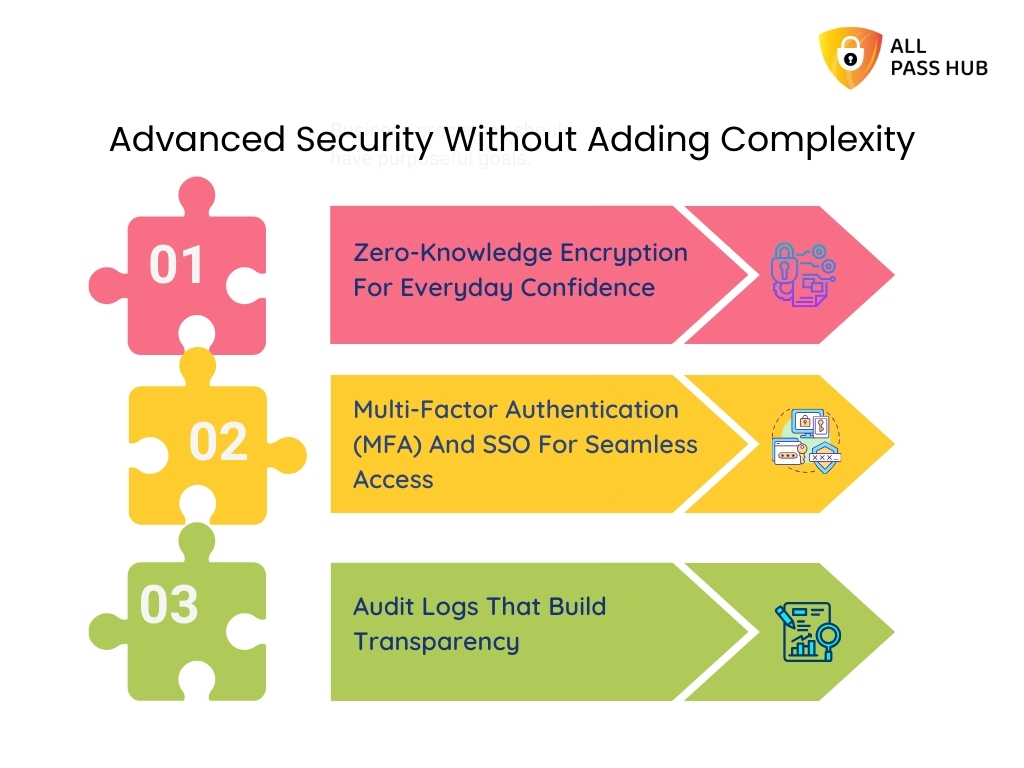
            Advanced Security Without Adding Complexity

            Advanced Security Without Adding Complexity

            Security is often where teams hit a wall. Many password managers burden employees with complex settings, leaving them frustrated or bypassing security altogether. However, an authentic enterprise password management should feel protective without being disruptive. 

            Here is how All Pass Hub demonstrates that advanced safeguards can work silently in the background while making collaboration smoother.

            Zero-Knowledge Encryption For Everyday Confidence

            Unlike traditional systems where data passes through provider servers unencrypted, All Pass Hub encrypts credentials locally before leaving a device. This zero-knowledge password manager approach ensures no one, not even the service provider, can view or access team vaults. 

            Sensitive information stays in the team’s hands, aligning with enterprise compliance standards.

            Multi-Factor Authentication (MFA) And SSO For Seamless Access

            One password should never carry the entire weight of security. All Pass Hub combines multi-factor authentication with single sign-on integration, balancing protection and usability. 

            Teams log in quickly with 2FA, OTPs, or authenticator apps while organizations gain enterprise password security solutions that comply with industry regulations.

            Audit Logs That Build Transparency

            Often seen as a feature only for IT teams, audit logs actually improve trust across distributed workforces. 

            By showing who accessed which credentials and when, these logs prevent shadow IT, reduce insider threats, and provide compliance-ready records without slowing teams down.

            ➡️Scenario in Action: A marketing team shares access to an ad platform. With MFA enabled, each login is verified in seconds. If someone in another region logs in unexpectedly, the audit log flags it instantly, allowing the manager to revoke access before any damage happens.

            Must-Know Insight: Advanced safeguards should not complicate collaboration. With zero-knowledge encryption, multi-factor authentication, and audit-ready logs, All Pass Hub reinforces team password security, keeping workflows friction-free.

            Collaboration Without Friction

            Strong security is paramount. However, if it slows down teamwork, employees will undoubtedly look for shortcuts. The real test of any team password manager is whether it enables people to share, access, and manage credentials without creating friction. 

            Here is how All Pass Hub excels in making collaboration hassle-free.

            Secure Sharing Without Risky Shortcuts

            Instead of copying passwords into emails or Slack threads, All Pass Hub enables protected team password sharing. Credentials remain encrypted, and teammates gain access without ever seeing the actual password. It ensures collaboration continues smoothly while data stays safe.

            Role-Based Access Control That Scales With Teams

            Different roles demand different levels of access. With All Pass Hub, administrators can assign permissions at the level of admin, manager, or contributor. This flexibility ensures governance without micromanagement. It provides every team member with just the authorization they need.

            Credential Sharing That Follows Best Practices

            Beyond one-off access, All Pass Hub offers time-limited and revocable sharing options. Agencies, IT consultants, or client-facing businesses can confidently share access without handing over permanent control. It aligns with credential sharing best practices and reduces enduring security risks.

            ➡️Scenario in Action: A design agency needs to share credentials for a client’s content management system with three freelancers. Instead of revealing the password in plain text, the manager grants temporary access through All Pass Hub. Once the project ends, access is revoked instantly. It keeps the client’s data protected.

            Knowledge Drop: Frictionless collaboration does not mean cutting corners. With secure sharing, role-based access, and flexible controls, All Pass Hub ensures that teamwork stays uninterrupted without weakening password security for business.

            Building A Culture Of Compliance And Oversight

            Compliance is not just a checklist; it is a culture that protects teams, clients, and business reputation. When credentials are unorganized and supervision is weak, even the best security policies lose their weight. 

            A team password manager that embeds monitoring, reporting, and governance into everyday use helps shift organizations from reactive fixes to proactive defense. 

            To understand how this works, let’s break down three pillars that turn compliance from a burden into a natural practice.

            Security Dashboards That Guide Better Behavior

            A password manager security dashboard highlights weak logins, reused credentials, and outdated practices. By addressing these issues in real-time, teams learn to enhance habits instead of waiting for breaches to expose mistakes.

            Governance Curve: Moving From Reactive To Proactive Oversight

            Organizations often struggle with governance because it appears complicated. Oversight becomes simple with audit-ready logs and access reports. This shift creates a commanding curve, where businesses evolve from reacting to incidents to proactively preventing them.

            Compliance Made Simple With Audit Logs As Culture

            Audit logs are not just paperwork for regulators. They are living records that promote accountability across distributed teams. By making logs accessible and transparent, businesses foster a culture where adherence is embraced rather than enforced.

            What You Should Know: Strong oversight creates confidence. Dashboards, governance tools, and audit logs make compliance a culture that protects both teams and clients every day. 

            Future-Readiness: What’s Next For Team Passwords

            Workplaces worldwide are evolving rapidly. Remote-first cultures, global collaboration, and rising compliance standards are driving businesses to rethink how they protect digital access. 

            Traditional password practices cannot keep pace with emerging risks or user expectations. This is why future-ready password management focuses not only on solving today’s problems but also on preparing for tomorrow’s needs. 

            Let’s explore the three state-of-the-art shifts shaping the future of team password security.

            Passkey Readiness And Passwordless Evolution

            Passkeys and passwordless systems are quickly becoming industry standards. A forward-looking team password manager equips organizations with compatibility for these methods, reducing dependency on static credentials and closing the door on phishing attacks.

            AI-Powered Detection For Insider Threats

            Cyberattacks are not the only concern; insider misuse is equally dangerous. AI-driven monitoring can spot irregularities in login attempts, unusual access patterns, or suspicious sharing behavior. This proactive detection strengthens resilience across distributed teams.

            Preparing Businesses For Tomorrow With Scalable Management

            Future growth demands growth-friendly enterprise password management. Whether a startup or a multinational, teams need tools that evolve with them, integrating with collaboration platforms, identity management systems, and compliance frameworks seamlessly.

            Final Thought: The future of password management blends passkeys, AI detection, and scalable systems. It ensures businesses stay ahead of threats while empowering teams to focus on performance. 

            Tomorrow's Security Starts With Today's Setup

            Conclusion

            Every reset, every scattered spreadsheet, and every forgotten login chips away at a team’s ability to move fast and stay protected. What appears like a minor inconvenience quickly escalates into lost productivity, frustrated employees, and costly vulnerabilities that present-day organizations cannot afford. 

            Throughout this guide, we’ve explored how centralized vaults, secure sharing, and advanced features like zero-knowledge encryption, MFA, and compliance-ready logs transform password management from a burden into an advantage. 

            By consolidating credentials into a unified secure system, teams eliminate wasted time, lower risks, and create a culture of trust across the workplace.

            All Pass Hub brings these ideas to life. Designed for collaboration, it delivers encrypted storage, seamless sharing, and supervision tools that help businesses stop password waste and streamline team login details without adding complexity. 

            Whether you are a startup seeking efficiency or an enterprise building resilience, it scales with your needs while keeping access simple and protected. 

            ➡️Remember, the future belongs to teams that guard their digital backbone while focusing on what matters most. With All Pass Hub, wasted minutes turn into momentum, and disorganized logins turn into streamlined access. 

            FAQ

            How Secure Is Centralized Password Management?

            Centralized password management uses encryption, multi-factor authentication, and access controls to protect data. 

            Instead of disorganized logins vulnerable to leaks, credentials are stored in a secure vault with audit trails. It minimizes weak spots and helps teams meet compliance standards.

            Can Teams Scale From Small Business To Enterprise?

            Yes, modern team password managers like All Pass Hub are built to scale. Small businesses can start with an affordable plan of $0.99/month and $6.99/year. 

            In contrast, enterprises can expand into role-based access, audit logs, and SSO integrations with customized plans. The platform grows with the organization without adding complexity.

            What Happens If Someone Forgets The Master Password?

            Forgetting the master password does not mean a permanent lockout. All Pass Hub offers recovery options like passkey-based resets or recovery keys. These methods ensure teams regain access without exposing sensitive data, maintaining both usability and security.

            Is Secure Password Sharing Safe For Client Projects?

            Yes, secure password sharing tools protect credentials by granting access without revealing the actual password. It ensures agencies, consultants, or distributed teams can collaborate with clients while maintaining confidentiality, total control, and the ability to revoke authorization at any time.

            How Does All Pass Hub Compare To Other Team Password Manager Software?

            Unlike many alternatives, All Pass Hub combines unlimited storage, zero-knowledge encryption, MFA, and compliance-ready reporting at an affordable price. Its focus on simplicity and team collaboration sets it apart from competitors that often add unnecessary intricacy or costly limitations.

            How All Pass Hub Helps High-Performance Teams Manage Credentials Smartly

            You will be surprised to know that nearly 80% of hacking-related breaches happen due to stolen or weak credentials. The stakes are even higher for high-performance teams as they rely on dozens of platforms daily, from project management apps and developer repositories to payment portals and client dashboards. 

            Every login becomes a potential weak spot if not handled carefully.

            Here’s the sad part: many teams still depend on outdated habits, such as storing credentials in spreadsheets, reusing weak passwords, or sharing logins over chat apps. 

            The result is an open invitation to data theft, compliance failures, and costly operational delays. We are midway through this decade, and password security for teams is no longer a minor IT task; it has become the foundation of enterprise resilience.

            That is why this blog shares valuable insights about modern credential management and enterprise password management tools. 

            Solutions like All Pass Hub demonstrate how a high-performance team password solution can combine simplicity with strength. By keeping everything in a secure vault, enabling role-based access, and ensuring zero-knowledge protection, teams gain both speed and confidence.

            Let’s explore how teams can guard their digital backbone without hampering productivity. 

            Core Challenges Teams Face In Password Management

            Did you know that nearly 70 percent of professionals feel overwhelmed by the number of passwords they juggle daily? For high-performance teams, this chaos is magnified across dozens of platforms, making credential security both a necessity and a burden. 

            Let’s break down the most pressing challenges that hinder team productivity.

            Uncontrolled Sharing

            Credentials are often exchanged through chat apps, email, or spreadsheets. These shortcuts expose sensitive data to leaks and misuse.

            IT Overload

            When reset requests pile up, IT teams spend valuable hours on low-level tasks instead of driving strategic innovation.

            Shadow IT

            Employees frequently sign up for tools without IT oversight, leaving accounts unmonitored and vulnerable to breaches.

            Compliance Headaches

            Industries that depend on compliance risk penalties, lost trust, and operational setbacks without audit trails or reporting.

            ➡️The exciting part is that solutions do exist. They not only resolve these problems but also transform them into opportunities for collaboration, trust, and growth.

            In a Nutshell: Teams that rely on obsolete methods risk inefficiency and breaches. Credential management software turns password chaos into clarity, control, and compliance. 

            Why Simplicity Equals Security In Enterprise Credential Vaults

            Most teams assume that robust protection requires complex tools, but the truth is the opposite. The more cluttered a system becomes, the more likely users are to make mistakes or avoid the tool altogether. 

            Let’s explore how over-complication weakens adoption and why a streamlined approach is the real strength in enterprise password management.

            Overcomplicated Tools Create Risky Workarounds

            When dashboards require endless clicks, employees bypass them by saving credentials in browsers, reusing old passwords, or worse, writing them down. Instead of reinforcing security, complex tools drive people toward unsafe shortcuts.

            Clutter Blinds Users To What Matters

            Interfaces crammed with dozens of little-used features bury the essentials. Instead of quickly accessing a password vault for business, staff waste time navigating tabs and menus, leaving gaps in both productivity and protection.

            Intricacy Lowers Adoption Rates

            A password manager only works if everyone uses it consistently. If the platform feels heavy, many users will abandon it. It creates silos of unsecured data and affects the primary purpose of enterprise password management.

            Credential management software transforms security into a seamless part of daily workflows by focusing on user-friendliness. A high-performance team password solution, such as All Pass Hub, ensures that every member, from IT professionals to non-technical staff, can safeguard data with confidence.

            ➡️The result is a tool that blends into the background while delivering maximum security impact.

            Essential Insight: A user-friendly, intuitive enterprise credential vault aims to fortify adoption, improve business workflows, and prevent security gaps at scale.

            All Pass Hub: A Team-First, Enterprise-Ready Password Manager

            The actual test of a password manager for teams is not just its encryption algorithms but how well it fits into the everyday rhythm of business. High-performance teams require a tool that adapts to their workflows, scales effortlessly, and enforces enterprise password management standards without being overwhelmed. 

            It is where All Pass Hub makes a striking impression. How? Let’s explore.

            Built on Zero-Knowledge Foundations

            All Pass Hub follows a zero-knowledge password manager model. Credentials are encrypted locally before they enter the cloud. It means no one, not even the provider, can access a vault. This approach guarantees privacy while aligning with the latest compliance requirements.

            Designed for Every Growth Stage

            Whether you are a start-up searching for a reliable password manager for a small business or an enterprise with thousands of employees, All Pass Hub adjusts to your scale. 

            It evolves with your needs. It offers the same resilient vault for business while supporting advanced role-based access for large teams.

            Remote-First and Collaboration-Ready

            Global teams cannot afford silos. All Pass Hub is a team password manager software that enables secure password sharing across distributed offices. 

            From client-facing agencies to IT departments, every user benefits from seamless access. It empowers managers to retain visibility and control through the enterprise credential vault.

            By combining rigorous security with an experience designed for real teams, All Pass Hub positions itself as both a business password manager and a high-performance team password solution. It does not just store credentials; it ensures teams move faster without sacrificing security.

            The Crux: All Pass Hub adapts to modern work. From small businesses to global enterprises, it delivers enterprise credential management that has privacy, scalability, and effortless collaboration. 

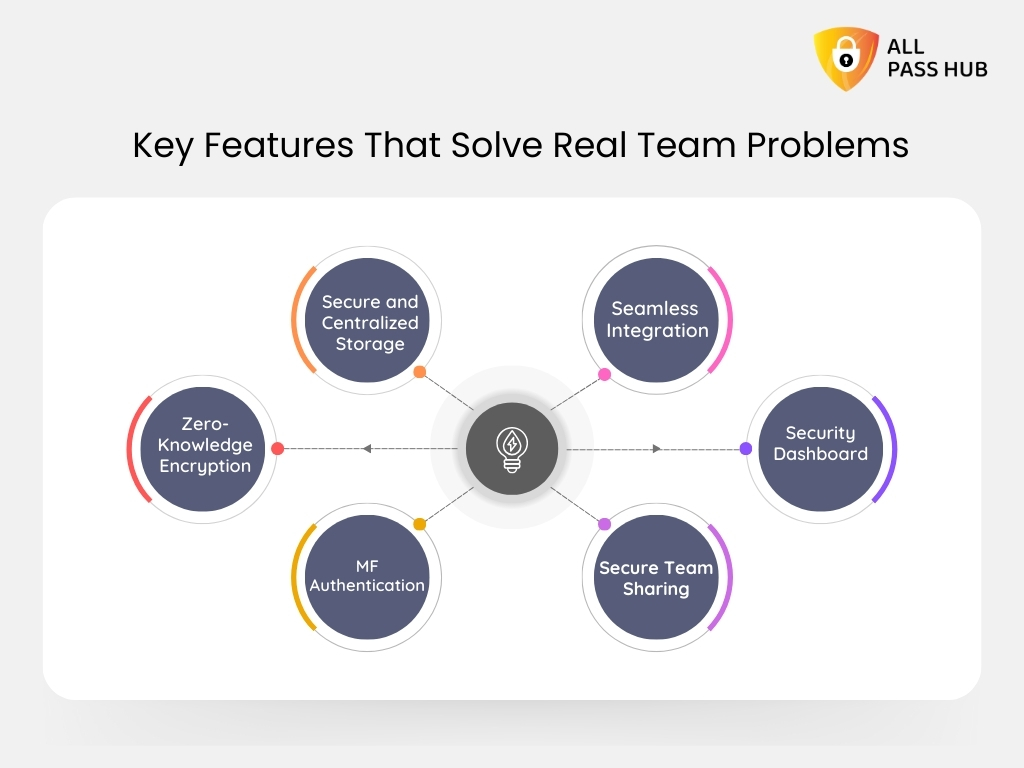
            Key Features That Solve Real Team Problems

            Key Features That Solve Real Team Problems


            The actual test of a password manager for teams is not just its encryption algorithms but how well it resolves the everyday hurdles that drain productivity and expose organizations to risk. 

            High-performance teams require a systematic tool that eliminates friction, safeguards sensitive data, and enables seamless access across every device. It is where All Pass Hub shines. It turns common challenges into lasting strengths with its following core features.

            Secure and Centralized Storage

            Scattered spreadsheets and forgotten sticky notes expose organizations to unforeseen risks. All Pass Hub offers a single password vault for businesses. 

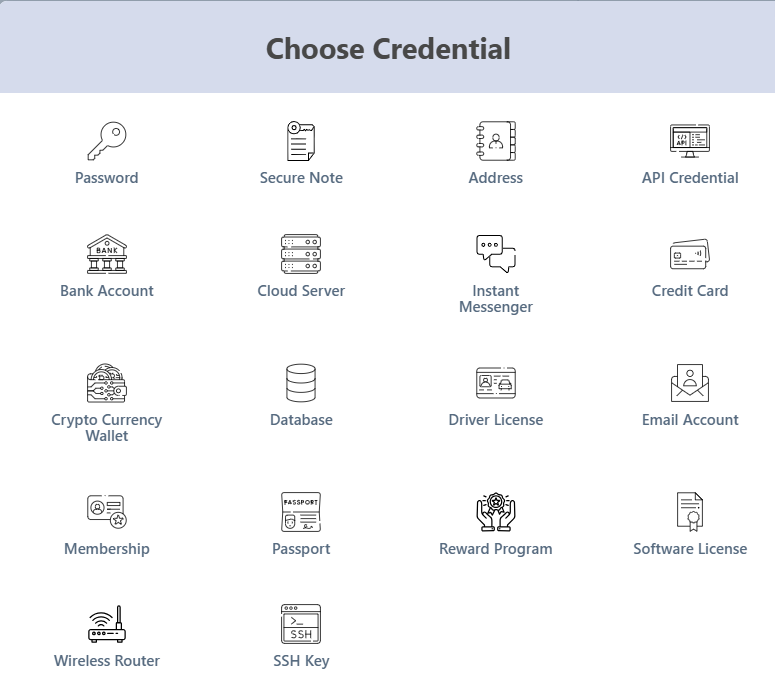
            You can store credentials, payment cards, licenses, and even proprietary data in a consolidated place. With instant cloud sync, every update is available across devices, ensuring continuity and removing confusion. 

            store credentials, payment cards, licenses, and even proprietary data in one place

            Zero-Knowledge Encryption and Breach Protection

            All Pass Hub encrypts data on the client side before it ever leaves the device. With its zero-knowledge password manager model, even the provider cannot access a vault. 

            Encryption begins with PBKDF2-SHA256 and 600,000 unique iterations to derive a secure key, followed by AES-128 encryption for vault data. 

            End-to-end encryption has dual-key protection that adds an extra safeguard, requiring both the login password and master key to decrypt credentials. 

            This layered structure shields teams against brute-force attacks and phishing tactics.

            Multi-Factor Authentication and SSO Integration

            Passwords alone are not enough. All Pass Hub integrates multi-factor authentication with options such as 2FA, OTP, and authenticator apps. 

            For enterprises, single sign-on integration aligns with compliance needs while ensuring login convenience at scale. This combination ensures that both protection and compliance are achieved without friction.

            Secure Team Sharing and Role-Based Access

            Teams often fall into risky patterns, sharing logins over chat or email. All Pass Hub eliminates this hazard with a team password sharing tool that never reveals the actual password. 

            Administrators can assign role-based permissions, allowing superior control over who can view, edit, or revoke access. It ensures that teams stay efficient while credentials remain secure.

            Security Dashboard and Compliance-Ready Audit Logs

            Monitoring matters as much as storing. All Pass Hub’s security dashboard highlights weak or reused passwords before they escalate into threats. Audit logs track logins, devices, and credential-sharing activity, creating a transparent trail that supports compliance reviews with ease.

            Seamless Integration and Accessibility

            From browser to mobile to desktop, All Pass Hub ensures accessibility without compromise. Its Chrome & Firefox extension powers instant autofill, while apps serve daily business users. 

            It has built-in secure storage of API keys and repository credentials for developers. This flexibility ensures every department, from marketing to IT, works securely without interruptions.

            Smart Summary: All Pass Hub combines centralized storage, zero-knowledge encryption, secure sharing, and compliance-ready oversight. It turns everyday credential challenges into organizational strengths. 

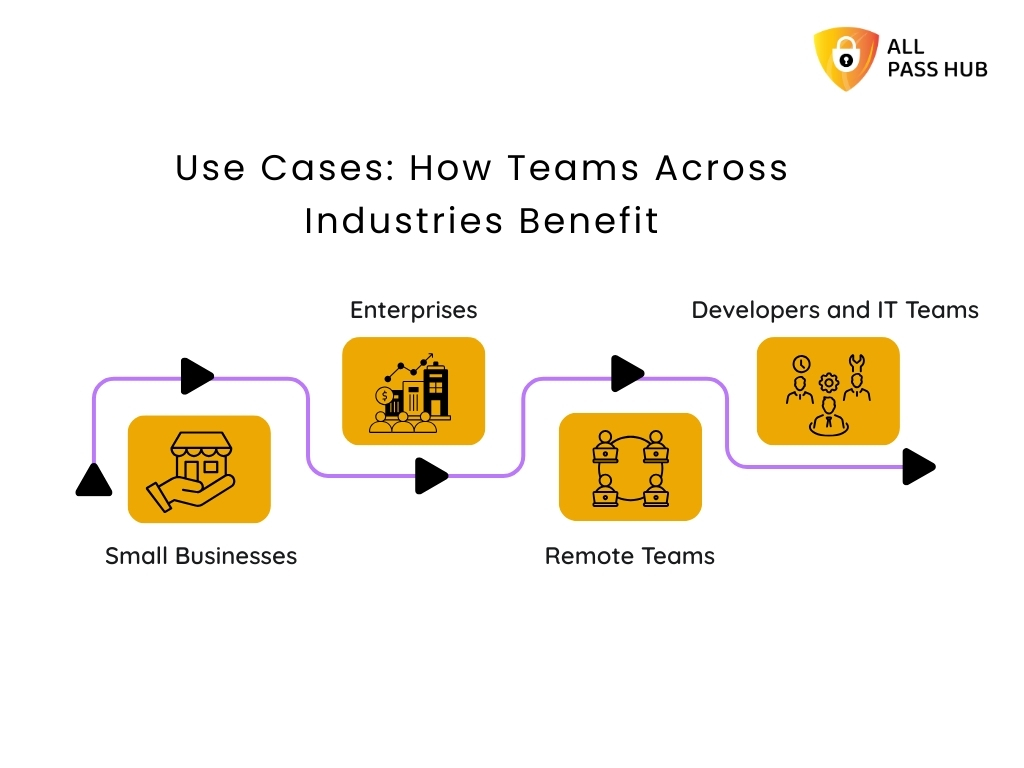
            Use Cases: How Teams Across Industries Benefit

            Use Cases: How Teams Across Industries Benefit

            Different teams face unique challenges in credential management, yet the risks are universal. All Pass Hub addresses these pain points directly by offering solutions that feel tailored rather than generic. It is designed to adapt to businesses of every size and sector, turning password security for teams into a growth enabler rather than an administrative burden. 

            Here is how it creates impact across industries.

            Small Businesses

            • Challenge: Many small businesses still juggle credentials in spreadsheets or shared emails, creating unnecessary exposure to breaches. With limited IT staff, they often cannot afford complex enterprise tools.
            • All Pass Hub Solution: An affordable password manager for small businesses with

            It delivers enterprise-grade protection at just $0.99/month and $6.99/yearly without adding technical overhead.

            Enterprises

            • Challenge: Enterprises struggle with scale, compliance, and maintaining visibility across thousands of employees. Shadow IT and poor audit trails create blind spots that can lead to costly incidents.
            • All Pass Hub Solution: A centralized enterprise credential vault with reporting, audit logs, and role-based permissions. 

            It provides leaders with the control and oversight they need, while meeting regulatory requirements through customized pricing plans for your needs.

            Remote Teams

            • Challenge: Distributed teams often resort to sharing logins over chat apps or email, which increases the likelihood of leaks. Lack of centralized management leaves remote managers guessing who has access to which credentials.
            • All Pass Hub Solution: A secure team password sharing tool that allows global collaboration without exposing credentials. Managers can grant, revoke, or monitor permissions instantly, ensuring productivity with peace of mind.

            Developers and IT Teams

            • Challenge: Developers often handle sensitive assets such as SSH keys, API credentials, and repository logins. Storing them in plain files or local notes creates dangerous vulnerabilities.
            • All Pass Hub Solution: A password manager for developers with encrypted storage, API key management, and easy integration with workflows. It reduces the risk of accidental exposure and fortifies security at the core of technical operations.

            A Visual Glance At How Different Teams Benefit

            Team TypeCommon ChallengesHow All Pass Hub HelpsBest-Fit Plan
            Small BusinessesStruggle with scattered credentials, lack of secure storage, and limited IT resources.Affordable password manager for small businesses with unlimited credentials, 2FA, and centralized storage to keep everything organized.Premium Plan (budget-friendly with advanced features).
            EnterprisesRequire compliance-ready oversight, role-based permissions, and visibility across thousands of users.Enterprise credential vault with audit logs, reporting, IP rules, and advanced role management for complete control.Organization Plan (scalable and compliance-focused).
            Remote TeamsFace risks of insecure sharing over chat or email and difficulty managing access across global offices.Team password sharing tool with role-based access, real-time activity logs, and cloud sync for distributed teams.Premium or Organization Plan (depending on team size and compliance needs).
            Developers & IT TeamsNeed secure storage for SSH keys, APIs, and repository credentials without slowing workflows.Developer-ready password manager for secure credential storage, Chrome extension for autofill, and support for API keys.Premium Plan (developer features at an affordable cost).

            The Bottom Line: Each team faces unique password challenges, from weak storage to compliance gaps. All Pass Hub resolves them with tailored protection, scalable sharing, and compliance-ready oversight. 

            Which Team Story Feels Like Yours

            How All Pass Hub Prevents Common Password Risks

            Every organization, regardless of size and scale, faces recurring password-related challenges. What separates a trustworthy solution from the rest is how effectively it addresses these risks in real-time. 

            Here’s how All Pass Hub keeps teams secure and boosts their productivity.

            Password Reuse Problems

            Employees often recycle the same password across multiple platforms, creating a chain reaction risk if one service is breached.

            • The All Pass Hub Fix: A built-in password generator delivers unique, unbreakable credentials for every login. It eliminates the threats of password recycling.

            Weak Password Risks

            Many users still create short, predictable passwords that hackers can guess with brute force.

            • The All Pass Hub Fix: The password strength checker flags weak entries instantly, encouraging users to adopt resilient combinations before they are stored.
             password strength checker

            Forgotten Passwords and Lockouts

            Teams waste hours resetting forgotten credentials, causing frustration and productivity loss.

            • The All Pass Hub Fix: A secure recovery system with passkey email recovery and guided reset ensures accounts can be regained without compromising safety.

            Unsafe Habits and Poor Practices

            Writing passwords on paper or sharing them via email leads to security blind spots.

            • The All Pass Hub Fix: Real-time monitoring through the security dashboard promotes safe password practices and detects risks before they escalate. Ensure to: 

            ✅ Prevent password reuse

            ✅ Flag weak entries instantly

            ✅ Enable secure recovery

            ✅ Encourage safe password practices

            Core Insight: All Pass Hub does more than store credentials. It actively prevents easy-to-guess login details, password reuse, and unsafe practices. It provides teams with protection that evolves with their needs. 

            All Pass Hub vs. Competitors: The Clear Edge

            Selecting the best password manager for teams often comes down to balancing security, usability, and cost. Many established tools deliver solid encryption. However, they frequently overwhelm teams with steep pricing tiers, limited free plans, or cluttered interfaces. 

            All Pass Hub positions itself differently. It provides a business password manager that offers enterprise-grade protection while staying affordable and user-friendly for everyday adoption.

            Where some competitors restrict collaboration to paid tiers or cap the number of stored credentials, All Pass Hub includes unlimited storage and secure sharing even in its free plan. 

            Its zero-knowledge password manager model ensures privacy, while premium plans expand enterprise functionality without draining budgets. 

            Here is its visual comparison with competitors for your better understanding and informed decision-making.

            A Comparison Snapshot with Competitors

            FeatureAll Pass HubTypical Competitors
            Free PlanUnlimited credentials, secure sharing, dashboard, and audit logsOften limited to 25–50 credentials, sharing is locked behind a paywall
            Premium Plan$0.99/month or $6.99/year, includes extra credential types and recovery supportUsually $2–$4/month with incremental feature unlocks
            Enterprise FeaturesRoles, groups, IP rules, audit trails, and reportingAvailable only in high-cost enterprise packages
            Encryption ModelZero-knowledge, client-side AES-128 with PBKDF2-SHA256Zero-knowledge AES, but often with fewer customization options
            CollaborationUnlimited sharing for individuals and teamsSharing is often capped or restricted to premium tiers
            Ease of UseClean interface designed for high-performance teamsComplex dashboards with a steep learning curve

            Key Takeaway: Unlike competitors, All Pass Hub delivers enterprise-level features at a fraction of the cost (even less than the cost of a coffee). It makes it one of the best password managers for teams that value both protection and simplicity.

            Step-by-Step: Setting Up All Pass Hub For Teams

            Step by Step - Setting Up All Pass Hub For Teams

            Getting started with All Pass Hub is quite straightforward. It empowers teams to move from sign-up to secure credential management in minutes. The setup process ensures that security is embedded right from the first step. 

            Here is how you can get started.

            Step 1: Create an Account and Master Password

            Begin by creating your All Pass Hub account. Set a master password that acts as the key to your vault. Make it unique, lengthy, and resistant to guesswork.

            Step 2: Enable Multi-Factor Authentication (MFA) and Recovery Key

            Add an extra layer of defense with MFA using 2FA, or authenticator apps. Download your recovery key and store it securely to avoid future lockouts.

            Step 3: Install Browser Extensions and Apps

            Equip your team with the Chrome or Firefox extension for instant autofill, as well as mobile and desktop apps. It ensures credentials are always within reach across devices.

            Step 4: Import Team Credentials

            Centralize existing logins, API keys, and payment details into the cloud-based password manager. It mitigates disorganized storage and establishes one secure origin (source).

            Step 5: Assign Roles and Permissions

            Use team credential management features to assign roles such as admin, manager, or member. Control access according to responsibility. It will keep collaboration efficient and guarded.

            Step 6: Monitor With Dashboard and Audit Logs

            The password manager security dashboard highlights weak or reused credentials, while audit logs track activities for compliance and supervision. It gives leaders complete visibility.

            What This Means for You: Setting up All Pass Hub takes only a few steps. It lays a rock-solid foundation for password security for teams, from small businesses to global enterprises. 

            From Guide To Vault In Less Than 5 Minutes

            Conclusion

            High-performance teams thrive on precision, speed, and trust. Yet, even a minute oversight in credential handling can disrupt operations. 

            Weak passwords invite cyber risks, poor sharing practices compromise client confidence, and scattered storage drains productivity. Future-ready teams recognize that protecting access is the backbone of business continuity.

            Throughout this blog, we explored how All Pass Hub transforms this vision into reality. It combines zero-knowledge encryption, multi-factor authentication, audit-ready logs, and seamless sharing to keep credentials secure while empowering collaboration. 

            Whether you are a growing startup searching for a password manager for a small business or a global enterprise enforcing strict compliance, All Pass Hub scales to match your needs while keeping operations effortless. 

            The future of digital-first teams will belong to those who reinforce their foundation. All Pass Hub is a high-performance team password solution that protects logins, streamlines teamwork, and strengthens resilience. 

            Take a decisive step today to protect your digital backbone with a password manager that blends enterprise-grade security with everyday simplicity.

            FAQ

            Can A Password Manager Integrate With Tools My Team Already Uses?

            Yes. Many enterprise password managers, including All Pass Hub, integrate with browsers, productivity apps, and developer tools. It ensures credentials can be autofilled, synchronized, and securely accessed without disrupting workflows. 

            Integration eliminates manual entry and improves adoption across distributed teams.

            How Does A Password Manager Protect Data If Servers Are Compromised?

            With zero-knowledge encryption, data is encrypted on the client side before reaching servers. Even if a server is breached, attackers cannot read vault contents. 

            Multi-factor authentication and breach monitoring add additional layers of protection, ensuring credentials remain inaccessible to unauthorized parties.

            What Happens If My Team Outgrows The Free Plan?

            Free plans typically cover essentials such as unlimited device logins and credentials storage. However, as teams expand, advanced features such as audit logs, white glove onboarding, role-based access, and compliance reporting become vital. 

            Upgrading to a business password manager plan ensures scalability, security, and supervision for larger teams.

            Is A Password Manager Suitable For Teams With Non-Technical Members?

            Absolutely. Modern team password managers are designed with user-friendly dashboards and intuitive sharing tools. Non-technical members can securely access credentials with minimal training. 

            Features like autofill, mobile apps, and role-based permissions make adoption easy across all skill levels.

            Can A Password Manager Store More Than Just Login Credentials?

            Yes. Many solutions go beyond storing usernames and passwords. Teams can save payment cards, license keys, API tokens, SSH keys, and even sensitive documents. 

            It creates a resilient, centralized vault for business information, reducing dependency on disorganized storage or insecure file sharing.

            All Pass Hub: Say ‘Hi’ To The Simplest Password Manager & ‘Bye’ To Complex Tools

            Here is an interesting statistic: Approximately 69% of Americans admit they feel overwhelmed by the sheer number of passwords they must manage, and 47% forget at least a few each month. [Source: Spacelift]

            Despite these struggles, 75% of people still fail to follow accepted password best practices, leaving accounts vulnerable to risks. Even more worrying, 44% of internet users rarely change or reset their passwords, making them susceptible targets for attackers. [Source: Spacelift]

            The irony is that tools designed to solve this problem often add salt to the wound. Many password managers bury users under cluttered dashboards, unnecessary features, and confusing plans. Rather than offering peace of mind, they create another layer of stress. 

            Hence, we have crafted this blog for individuals, families, and businesses seeking a way out of this cycle. Here, you’ll discover how All Pass Hub redefines password management by replacing chaos with clarity, bringing together strength, simplicity, and affordability in one seamless experience. 

            Let’s get started to provide you with genuine security without the headache of over-engineered software.

            Why Complex Password Managers Fail Users

            The promise of a password manager should be simple: save your logins, protect them, and make access seamless. Yet many tools on the market neglect this purpose and overwhelm users instead.

            Here is where most password managers go wrong: 

            • Cluttered Dashboards: Icons, settings, and nested menus create confusion instead of clarity.
            • Unnecessary Features: Rather than focusing on core protection, they add layers most people never use.
            • Confusing Pricing: Free trials often lead to hidden restrictions or costly premium upgrades.
            • Limited Sharing: Collaboration features are either capped or require multiple paid accounts.

            What should be peace of mind turns into frustration for individuals. The stakes are even higher for businesses. Teams waste time learning overly complicated systems. It often leads to weak adoption or risky workarounds like spreadsheets and shared documents.

            Instead of reducing stress, many password manager apps add to the chaos. Most of them fall flat at the one thing they were built to do: make security effortless.

            What You Should Know: Password managers should lighten the load, not increase it. Complexity drives abandonment, leaving users and businesses exposed to unnecessary risks.

            What Makes All Pass Hub Different: Simplicity First

            What Makes All Pass Hub Different: Simplicity First


            Where other tools complicate, All Pass Hub simplifies. It is created on the principle that security should feel effortless, not burdensome. Every feature aims to combine robust protection with an interface so intuitive that anyone can use it without second-guessing.

            Core simplicity-driven features include:

            • Zero-Knowledge Architecture: Only you hold the keys to your data. Even All Pass Hub can’t view or access your vault.
            • Two-Factor Authentication made easy: Extra protection without adding technical hurdles.
            • Clean, Intuitive Dashboard: Everything you need is within a few clicks, with no clutter or distractions.
            • One-Click Autofill and Browser Extension: Save and fill credentials instantly across websites without tedious copying and pasting.

            This focus on clarity means less time managing your passwords and more time using them with confidence. For individuals, it removes the burden of remembering endless logins. For businesses, it creates a tool that employees actually want to adopt, thereby reducing risky shortcuts.

            The Crux: All Pass Hub is a secure password manager that delivers advanced protection in its simplest form, proving that authentic security does not need to be complicated.

            How To Use A Password Manager Without The Confusion

            Using a password manager should never feel like learning a new language. All Pass Hub strives to be as straightforward as possible. You can set it up in minutes and start enjoying stress-free security instantly.

            Getting started is simple. You just need to:

            • Create your account and master password: This becomes your single secure key.
            • Save your logins automatically: As you browse, the All Pass Hub extension captures new credentials with one click.
            • Generate resilient passwords: Use the built-in strong password generator to create unique logins every time.
            • Sync across devices: Access your vault on desktop, mobile, or tablet without additional effort.

            In daily life, it means logging into your bank without fumbling through notes, checking out on shopping websites without manual entries, and staying connected on social media without repeated resets.

            Storing, protecting, and using passwords blends seamlessly into your routine with All Pass Hub. Rather than adding friction, it calmly works in the background to make every sign-in safer and quicker.

            Must-Know Insight: A practical password manager should fit into your life, not force you to adapt to it. All Pass Hub ensures every login feels effortless, secure, and consistent across all your devices. 

            CTA Image- From Setup To Autofill In Minutes

            Real-World Use Cases That Make Life Easier

            Real-World Use Cases That Make Life Easier

            The value of a password manager is best understood when you see how it fits into everyday scenarios. All Pass Hub aims to reduce friction irrespective of your profession or working style. 

            Here’s how different users benefit in practice:

            For Individuals

            • Seamless Daily Logins: Quickly access shopping, social, and banking accounts with autofill.
            • No More Password Resets: Robust, unique credentials are saved instantly and remembered for you.
            • Complete Peace of Mind: Your sensitive data stays secure without extra effort.

            Instead of scattered notes or repeated logins, individuals enjoy a smoother online routine backed by top-notch protection.

            For Teams

            • Unlimited Secure Sharing: Share authorization information safely without messy emails or spreadsheets.
            • Permission Controls: Grant, restrict, or revoke permissions in seconds.
            • Stronger Accountability: Activities are tracked, so managers know who accessed what.

            Teams collaborate more efficiently, saving time while ensuring credentials are never mishandled.

            For Remote Work

            • Cross-Platform Access: Remote staff can log in from any device without security risks.
            • Audit-Ready Logs: Every login is recorded with details for compliance and visibility.
            • Cost-Effective Security: Protect distributed teams without adding expensive overhead.

            For companies managing global teams, All Pass Hub ensures distance does not compromise protection.

            Smart Summary: All Pass Hub makes password management effortless and adaptable for everyone. It doesn’t matter whether they are individuals tired of resets, teams needing secure sharing, or remote workers balancing access with safety.

            Stay Organized Without The Hassle

            Stay Organized Without The Hassle


            Resilient protection is only half the battle. If you cannot quickly locate the correct login details when you need them, frustration follows shortly after. All Pass Hub mitigates that problem by combining organization with security, ensuring you stay in control without any trouble. 

            Here is how you can remain sorted:

            Security Dashboard

            • Instant Visibility: See weak, reused, or outdated passwords at a glance.
            • Proactive Alerts: Spot risks early rather than reacting after a breach.

            This dashboard acts as your control center, keeping you informed and prepared.

            Tags, Favorites, and Search

            • Clever Organization: Group credentials by projects, categories, or priority.
            • Quick Access: Save frequently used logins as favorites.
            • Time-Saving Search: Locate any passcode within seconds.

            These features mean no more scrolling endlessly or second-guessing where things are saved.

            Password Audit Tool

            • Comprehensive Review: Identify risky patterns in your stored credentials.
            • Guided Improvement: Replace weak entries with impenetrable, auto-generated options.

            Rather than managing chaos, you gain a clear, structured system that adapts to your workflow.

            What This Means For You: Coordination comes built-in with All Pass Hub. From dashboards to audit tools, every feature intends to keep your digital life structured, secure, and stress-free. 

            CTA image - Imagine Finding Every Login Before You Even Need It

            Simplified Sharing And Collaboration

            Sharing passwords is one of the most consequential security risks in any setting. Many people still send credentials through email, chat, or shared documents, which leaves sensitive data susceptible to cyberattacks. All Pass Hub eliminates these dangers by making sharing safe, seamless, and unlimited.

            Unlimited Secure Sharing

            • No Restrictions: Share logins with as many individuals or teammates as you need.
            • Consistency for Teams: Everyone uses the same credentials without errors or conflicts.

            It ensures productivity flows without compromising protection.

            Access Control and Notifications

            • Complete Authority: Approve, reject, or revoke permissions instantly.
            • Real-time Alerts: Stay informed whenever credentials are shared or accessed.

            You remain in control at all times with built-in transparency.

            Just-in-time Access

            • Temporary Permissions: Grant authorization for one-off projects or short-term tasks.
            • Auto-Revoke: Automatically restrict credentials once the passcode is no longer needed.

            This flexibility guards your vault while empowering collaboration.

            With these features, All Pass Hub transforms sharing from a vulnerability into a strength. Instead of worrying about how login details are distributed, you can focus on getting work done.

            The Bottom Line: All Pass Hub turns password sharing into a secure and controlled process. It gives individuals and teams the confidence to collaborate without fear of credentials exposure.

            Easy Recovery And Encrypted File Storage

            Forgetting a master password can feel like the ultimate nightmare. Many users fear losing access entirely, which often discourages them from trusting password managers in the first place. 

            All Pass Hub addresses this concern with a recovery system that is both simple and safe. 

            Here is what it offers you in terms of retrieval and file encryption.

            Password Email Recovery

            • Quick Assistance: If you forget your master password, you will receive a secure recovery PDF via email to regain access.
            • Safe Process: Instant notifications ensure you are always aware of recovery attempts.

            It means you can return to your vault without losing data or compromising the shield.

            File Vault For Sensitive Storage

            • Encrypted Protection: Store documents, certificates, and images with the same robust security used for your passwords.
            • All-in-one Solution: Guard credentials and critical files together in a centralized safe location.

            Instead of scattering your sensitive information across multiple platforms, you have a single, secure space that adapts to personal and business needs alike.

            Core Insight: All Pass Hub ensures peace of mind with both secure account recovery and encrypted file storage, proving that protection extends beyond just passwords. 

            Affordable And Transparent Pricing For Everyone

            Security should not come with confusing costs or surprise upgrades. All Pass Hub keeps pricing simple, transparent, and accessible for every user type, from individuals to large organizations.

            Free Plan

            • Unlimited Credentials: Store as many logins as you need without restrictions.
            • Built-in Security: Includes two-factor authentication, password strength meter, security dashboard, and email support.

            This plan is ideal for individuals seeking a reliable, free password manager that covers the essentials.

            Premium Plan ($0.99/month or $6.99/year)

            • Extra Credential Types: You can apply tags to saved credentials, search them by tag, and even pin favorites.
            • Affordable Security: With a yearly plan, users save nearly 41 percent compared to paying monthly.

            You get complete coverage for personal or professional use for less than the cost of a coffee each month.

            Organization Plan (Custom Pricing)

            • Advanced Controls: Includes user management, roles, groups, IP rules, and supervision.
            • Tailored Solutions: Pricing adapts to business size and requirements.

            This plan equips teams and enterprises with enterprise-grade tools at a cost designed for efficiency.

            In a Nutshell: All Pass Hub delivers powerful security without hidden fees. Whether you choose free, premium, or organizational plans, you receive unmatched value and clarity.

            Why Simplicity Equals Security: All Pass Hub vs. Complex Tools

            In cybersecurity, complexity often creates vulnerability. The more crowded and confusing a password manager becomes, the higher the chances of mistakes, poor adoption, or neglected updates. All Pass Hub takes the opposite approach, using simplicity as a pathway to stronger protection.

            Why simplicity matters:

            • No Clutter: A clean, intuitive dashboard reduces errors and makes every action deliberate.
            • No Upsells: What you see is what you get. There are no locked essentials or confusing feature tiers.
            • No Confusion: Straightforward navigation ensures anyone, from individuals to enterprises, can use it with confidence.

            A Visual Comparison of All Pass Hub vs. Complex Tools

            AspectComplex ToolsAll Pass Hub
            DashboardOverloaded with icons and hidden menusClean and intuitive with essentials only
            FeaturesBloated with extras, few users ever needFocused on secure storage, sharing, and recovery
            PricingMultiple tiers, hidden limitations, confusing upgradesTransparent and affordable with clear options
            User ExperienceSteep learning curve, high abandonment ratesSimple navigation, effortless daily use
            CollaborationLimited sharing or tied to expensive enterprise plansUnlimited sharing with controls built in
            Security OutcomesComplexity increases errors and weak adoptionSimplicity strengthens adoption and trust

            All Pass Hub eliminates distractions that put users at risk by focusing on what actually matters, such as secure storage, effortless sharing, and reliable recovery. Instead of trying to be everything at once, it provides everything you really need to stay protected.

            For individuals and businesses alike, this simplicity does not mean less power. It means fewer mistakes, minimal vulnerabilities, and greater trust in daily use.

            Key Takeaway: All Pass Hub proves that the most secure password manager is not the most complex; it is the one that makes protection clear, consistent, and effortless. 

            Security Shold Feel Simple, Not Stressful

            Expert Password Management Tips You Can Apply Today

            Good password management is not just about having the right tool; it is also about using it wisely. By combining proven best practices with the features of All Pass Hub, you create an unbreakable defense against digital threats. 

            Here are some handy tips we suggest applying from today to fortify your online security.

            Set a Resilient Master Password

            • Create a unique, complex master password that you do not reuse anywhere else.
            • This single password is the key to your vault, so treat it as the most pivotal credential you own.

            Avoid Password Reuse

            • Reusing the same login across multiple websites is one of the most significant risks.
            • With All Pass Hub, you can store unlimited unique passwords without the stress of remembering them.

            Use a Password Generator for Every New Login

            • Generate long, random, and intricate passwords instead of creating them yourself.
            • All Pass Hub’s built-in generator ensures every account is guarded with a passkey that attackers cannot easily guess.

            Review and Update Credentials Regularly

            • Use the security dashboard and audit tools to spot weak or outdated entries.
            • Replacing them with stronger versions keeps your accounts ahead of potential risks.

            Adopting these practices will reinforce your own security and set a higher standard for managing digital access in everyday life.

            Final Thought: Powerful habits combined with a secure password manager create lasting protection. With All Pass Hub, these best practices become simple actions that fit naturally into your daily routine. 

            Conclusion: Say ‘Hi’ To Simplicity, Say ‘Bye’ To Chaos

            Passwords are not going away, but the stress that comes with managing them can. Security tools should not confuse you with endless settings, complicated dashboards, or expensive upgrades. They should make life easier, safer, and more predictable. All Pass Hub is built on that vision. 

            Throughout the blog, we’ve explored how it combines military-grade encryption, a zero-knowledge model, and effortless features with a design anyone can use. 

            Whether you are an individual juggling dozens of logins, a family keeping accounts safe, or a business managing a distributed team, the solution remains the same: protection made simple. 

            By following the best practices shared here and trusting a tool built for clarity, you replace chaos with calm and uncertainty with confidence.

            ➡️Remember, the difference lies in how it feels to use. No clutter, no confusion, just effective control over your digital life. 

            So, say goodbye 👋 to sticky notes, reused logins, and password fatigue. Say hello to a secure, affordable, and easy password manager that finally puts you back in charge. Say ‘hi’ 🤝 to All Pass Hub. 

            FAQ

            Is My Data Safe With All Pass Hub?

            Yes. All Pass Hub uses zero-knowledge encryption. It means only you can access your vault. Data is encrypted with AES-128 and transmitted with TLS 1.2+. It ensures your credentials remain private and protected even if servers are attacked.

            Does It Work On Mobile And Desktop?

            Absolutely. All Pass Hub is a cross-platform password manager that works on Windows, macOS, iOS, Android, and prominent browsers. Your credentials sync securely across devices, so you always have access when you need it.

            Can I Share With My Team?

            Yes. All Pass Hub includes unlimited credential sharing with built-in access controls. Teams can collaborate securely. Managers can assign roles, create groups, and monitor activity logs for complete transparency.

            What If I Forget My Master Password?

            You can use passkey email retrieval. All Pass Hub provides a recovery PDF and instant notifications to help you reset safely, so you regain access without losing stored data.

            How Is All Pass Hub Better Than Browser Storage?

            All Pass Hub provides encrypted password storage, two-factor authentication, audit logs, and secure sharing, unlike browsers that store logins with minimal protection. Browser extensions are convenient. However, they cannot match a dedicated online password manager for safety and control.

            Is A Free Password Manager Enough For Me?

            The free plan includes unlimited credentials and 2FA, making it ideal for personal use. You get a few enterprise-level features with the free plan. They are better suited for professionals, families, and businesses needing advanced control.

            What Happens If All Pass Hub Servers Are Attacked?

            Even in the unlikely event of a breach, attackers cannot read your vault. All Pass Hub uses client-side encryption and dual-key protection. It ensures your data remains encrypted and inaccessible without your master key.

            Can Businesses Onboard New Employees Easily?

            Yes. With user and group management, supervisors can assign roles and credentials quickly. Teams gain access immediately, while managers retain comprehensive supervision through IP rules, audit logs, and access controls.