- Posted on March 13, 2026
- 8 Min Read
Most people don’t struggle with passwords because they don’t understand security. The real challenge is that the tools meant to help them often make the process harder. Traditional password generators create complex strings, but they rarely give users meaningful control. There’s usually no option to include memorable keywords, adjust passwords to match platform rules, generate readable results, or securely store what was created.
As a result, many users end up forgetting passwords, reusing them across platforms, or saving them in unsafe places, even when they try to follow good security practices.
In this blog, we will break down why standard password generators often fall short and how a keyword-based password generation approach can make passwords both strong and easier to remember. We will also explain how custom length and rule settings influence password strength and why these options matter more than most users realize.
Finally, we’ll look at how All Pass Hub brings password generation and password management together in one platform, helping individuals, teams, and MSPs create, organize, and securely store passwords without relying on multiple tools.
The Real Problem With Most Password Generators
Here’s what usually happens. You need a new password. You open a random generator, hit the button, and get something like:
xQ9#mLv!2kRw
Technically secure. Practically useless.
Neither can you remember it nor can you type it without triple-checking the password characters.
This scenario worsens when the platform accepts passwords that are at least 14 characters. What would you do now? Helpless again.
You are left manually tweaking a string that was already painful to work with.
The frustration compounds for teams. Someone generates a password, saves it in a spreadsheet (yes, still), shares it over Slack, and suddenly “secure” is a polite fiction.
Situations like this are not rare, as they highlight a pattern in how people actually end up dealing with passwords.
The gap is not just technical. It is about the password’s usability.
A password that no one can remember or type reliably is not a secure password, it’s a password that gets written on a sticky note or reused out of desperation.
What is a Keyword-based Password Generator?
A password generator based on keywords starts from something meaningful to you, a name, a word, or a phrase, and builds a secure password around it, rather than generating noise from scratch.
Instead of producing a random string, it takes your input and layers in the security elements: uppercase letters, numbers, symbols, and length requirements. The result is a password that still meets strong entropy standards but has a familiar anchor that makes it far easier to recall and type.
Think of it this way: “Sunrise” alone is weak. But “$unRise91#” is strong, structured, and something a real person can remember.
That’s the principle behind keyword-based generation; the logic, not just the output, is built for humans.
The security doesn’t come from randomness alone. It comes from applying intelligent rules consistently, so entropy stays high even when the password has a recognizable structure.
Key Features of All Pass Hub’s Password Generator
- Generate Passwords Using Names or Keywords
Generate strong passwords using names or keywords with All Pass Hub’s password generator.
The tool combines your chosen input with customizable length and character rules to create secure credentials that meet platform requirements.
Instead of producing completely random strings, it builds structured passwords around your keyword while still applying complex rules that maintain high entropy. This means even a recognizable anchor word results in a password that remains difficult to crack, balancing usability with strong security.
- Custom Length and Rule Settings
Different platforms have different requirements.
Some cap passwords at 16 characters. Others require a minimum of two special symbols. Most generators ignore all of that and leave you editing manually after the fact.
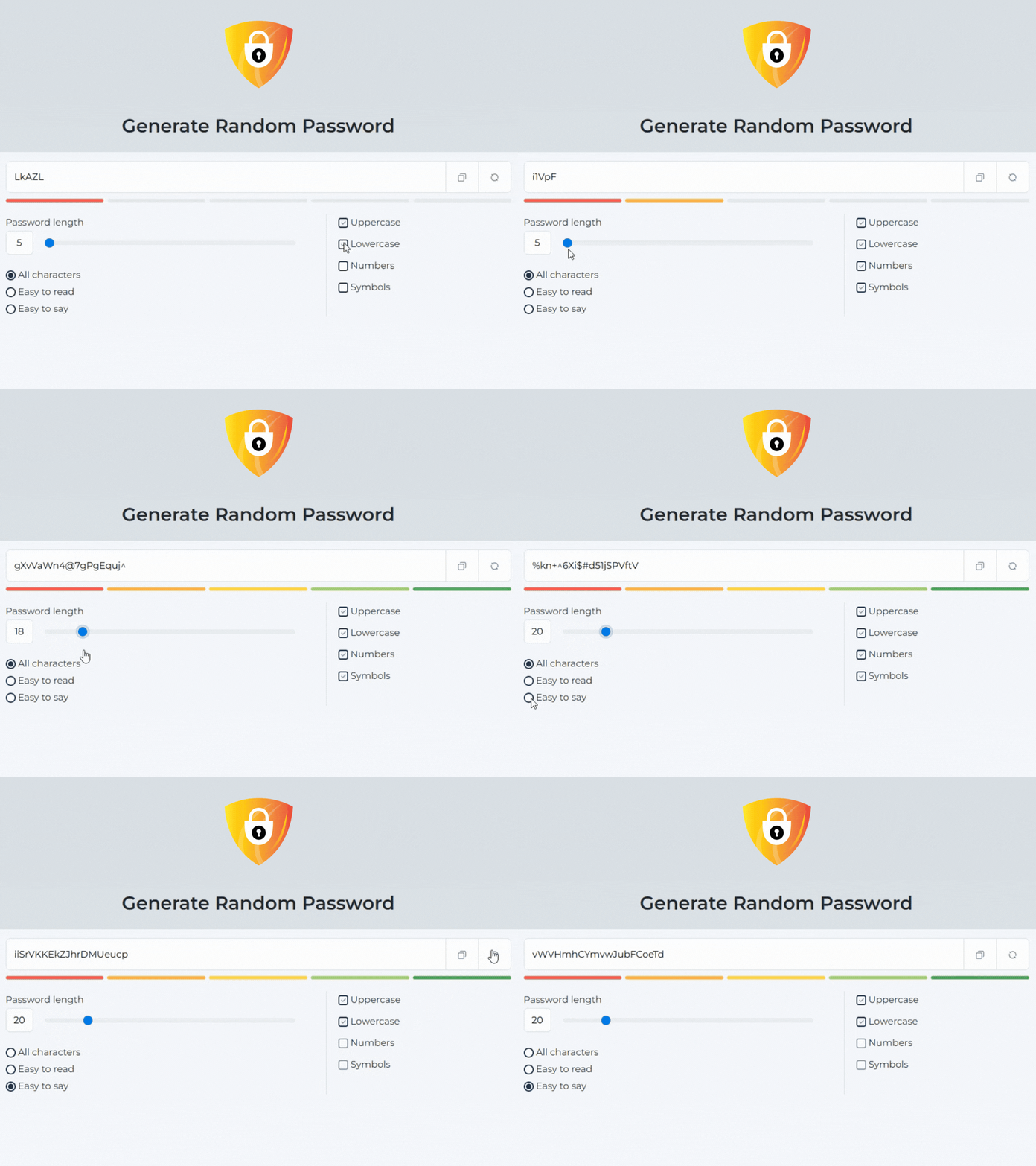
All Pass Hub’s password generator with custom rules and length settings lets you define exactly what you need before generating: character count, symbol inclusion, capitalization rules, and number placement.
The output fits the platform the first time, without manual adjustment.
- Easy-to-Read Output
Readability isn’t a compromise on security; it’s a feature that should not be ignored.
The password generator’s easy-to-read design means the output is structured and scannable, not a wall of ambiguous characters.
You can type it, read it back aloud to a colleague, or enter it on a mobile keyboard without losing your place.
Who Should Use This Tool?
Not everyone struggles with passwords in the same way. The situations are different, but the frustration is often the same: creating secure passwords that people can still work with.
All Pass Hub’s password generator is built to serve a wide range of users, each with genuinely different needs.
- Individuals Who Are Tired of Reusing the Same Password
Many people end up recycling the same few passwords across multiple platforms. Not because they want to, but because remembering completely random strings feels impossible.
A keyword-based password generator offered by All Pass Hub changes that by creating secure variations built around something familiar, making passwords easier to remember without weakening security.
- Freelancers and Founders Managing Too Many Logins
Freelancers and startup founders quickly accumulate a stack of platforms — project tools, billing systems, client portals, and cloud services. Each one requires its own login, and losing access to even one can slow down real work.
All Pass Hub makes it easy to generate unique passwords for every service without creating a management headache.
- Teams That Need to Share Credentials Without Creating Risk
For teams, the challenge is not just creating passwords but sharing them safely. Too often credentials end up in chat messages or shared documents simply because it’s the fastest option.
All Pass Hub allows teams to generate and share passwords through encrypted controls, removing the need for risky workarounds.
- Managed Service Providers Handling Credentials at Scale
MSPs manage credentials across multiple clients, systems, and environments. At that level, consistency, auditability, and control become critical.
All Pass Hub supports this workflow by making it easier to generate and manage large volumes of credentials reliably.
Not Just a Password Generator, But a Full Password Management System
Generating a strong password is only the first step. What happens after that is where most tools start to fall short.
Once a password exists, it needs to live somewhere secure. Not in a browser’s autofill. Not in a shared document. Not in someone’s head. It needs a place that protects it without making access complicated.
All Pass Hub connects the generation step directly to a secure vault, so you’re not juggling multiple tools or copying credentials between apps. As a password generator and manager in one, it allows you to store everything you need, including logins, passkeys, IDs, and sensitive notes, all protected by end-to-end encryption and a zero-knowledge architecture.
This means only you, or your authorized team members, can access what’s inside. Even All Pass Hub cannot see your data.
For teams, the benefits become even clearer as they grow. Instead of credentials scattered across spreadsheets, chat messages, or personal notes, everything lives in one organized and encrypted vault.
You can store unlimited credentials, so you don’t suddenly hit a cap at 50 or 100 entries, and your expanding work remains securely in your control.
Most password tools focus on passing a security audit. All Pass Hub focuses on something more practical: being genuinely useful to the people using it every day.
In practice, that means users get passwords that are both strong and readable, a generation system that reliably follows the rules they define, and a free entry point that requires no credit card details to get started.
All Pass Hub is built around a simple principle: a password only protects you if you can actually use it.
Takeaway
The challenge with passwords has never been that people do not care about security. The real problem is that most tools have historically made security feel like a punishment, random strings, no control over the output, nothing readable, and no practical way to manage what you generate.
All Pass Hub builds on that concept by combining password generation, rule-based customization, and secure storage in one place. Rather than switching between tools or improvising insecure workarounds, users can generate, store, and manage their credentials inside a single system designed for everyday use.
The result is a credential that works in the real world, something secure enough to protect your accounts, yet practical enough to remember, store, and manage.
Built on that principle, All Pass Hub brings password generation and password management together in one place. You can generate passwords based on keywords, apply the rules that matter, store them securely in an encrypted vault, and share them safely when needed.And the best part is that getting started does not require complicated setup or any credit card details. You can begin using the All Pass Hub password generator right away and explore a smarter way to create credentials that you can actually use with confidence.